FIFA Mobile: How to Change Your Kit
To change your kit in FIFA Mobile 22, open settings, tap select kit, and choose from kits you already own; new kits require a squad-building task.
2 min read
In brief
AI summaryIn FIFA Mobile, you can only set kits you already own as your active kit.
To change a kit, tap the select kit button in settings, choose a kit, and save it.
EA Sports may offer a League Kits Squad-Building Task around mid-season to unlock more league kits, though none is currently available.
Contents3 sections
Changing kits in FIFA Mobile is essential to give your team its own style. Especially if you've built a good team, you don't want your players running around in ugly kits. So how do you change your kit in FIFA Mobile? Have all the kits been released in FIFA Mobile 22? Where are the FIFA Mobile Süper Lig kits? Our answers to questions like these are in this article!

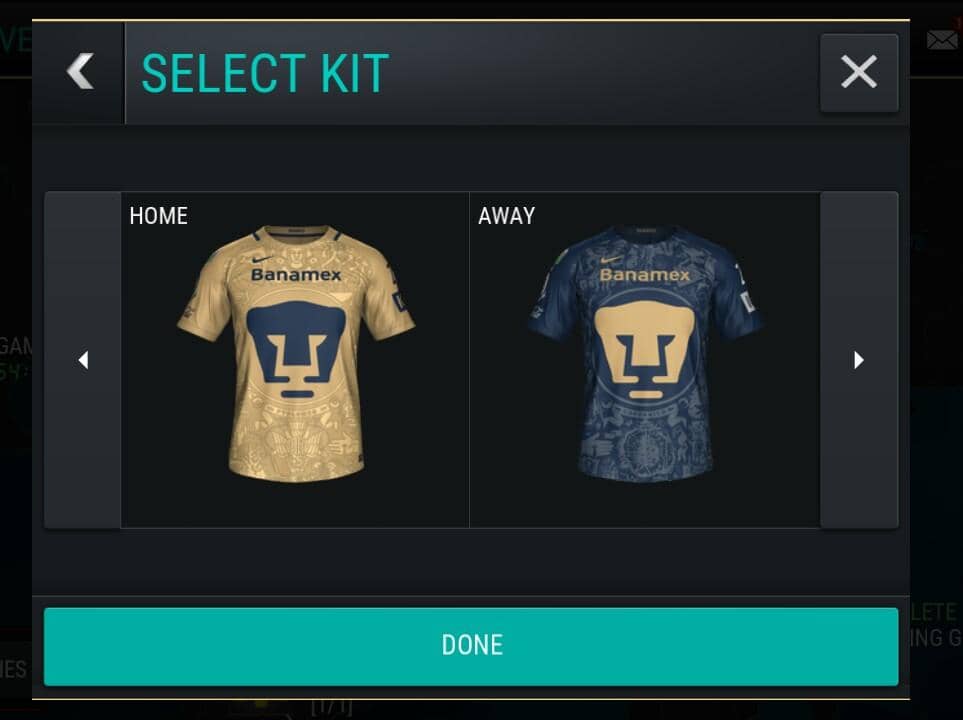
NOTE FOR THE CURIOUS: This kit belongs to UNAM, a team from the Mexican league :)
How Do You Get a Kit in FIFA Mobile?
First of all, you should know that you can only set kits you already own as your active kit. You can't make a kit you haven't earned or pulled from a pack your active kit. Unfortunately, we don't have that option. Around mid-season, through a squad-building task EA Sports releases called the League Kits Squad-Building Task, you can get kits for whichever leagues you want by handing over gold/silver players. Right now, though, no such task is available.
How Do You Change Your Kit in FIFA Mobile? 2022
Changing your kit in FIFA Mobile 22 is very simple. We've shown you how to change your FIFA Mobile 22 kit with screenshots! (NOTE: You can follow these same steps if you want to change your logo. Just tap "select logo" instead of "select kit".)
- Tap settings in the top right corner
- Tap the select kit button
- Choose your favorite kit from the ones you own
- Once you've selected a kit, you can see it on your player
- If you like the kit, save it and go back to the home screen
- Your kit will now be in the game!


Gamer Papers: For More FIFA Mobile Articles:
- Click the link for our article "How Do You Download FIFA Mobile 22?"!
- You can find FIFA Mobile 22's corner defending tactics at this link.
- Click this link to check out FIFA Mobile 22's Icon Journey mode!
- Click this link to learn about FIFA Mobile 22's New Beginnings mode!
- The new season's release date is in this article!
- Click this link for a full overview of what's new this season in FIFA Mobile 22.
- You can check out FIFA Mobile 22's system requirements and squad-building tasks.
- Click this link to check out FIFA Mobile 22 squad and team building tactics.
- Everything you need to know about the new Challenge Mode is in this article!
- Click this link to get information about the market in FIFA Mobile 22.
- Click this link to check out FIFA Mobile 22's January update notes.
Frequently asked questions
Questions answered in this article
How Do You Get a Kit in FIFA Mobile?
First of all, you should know that you can only set kits you already own as your active kit. You can't make a kit you haven't earned or pulled from a pack your active kit. Unfortunately, we don't have that option. Around mid-season, through a squad-building task EA Sports releases called the League Kits Squad-Building Task , you can get kits for whichever leagues you want by handing over gold/silver players. Right now, though, no such task is available.
Go to sectionHow Do You Change Your Kit in FIFA Mobile? 2022
Changing your kit in FIFA Mobile 22 is very simple. We've shown you how to change your FIFA Mobile 22 kit with screenshots! (NOTE: You can follow these same steps if you want to change your logo. Just tap "select logo" instead of "select kit".) Click the link for our article "How Do You Download FIFA Mobile 22?"! • You can find FIFA Mobile 22's corner defending tactics at this link . • Click this link to check out FIFA Mobile 22's Icon Journey mode! • Click this link to learn about FIFA Mobile 22's New Beginnings mode! • The new season's release date is in this article ! • Click this link for a full overview of what's new this season in FIFA Mobile 22.
Go to section