

How to Use Apple Music Sing (Karaoke) and Compatible Devices
As of December 2022, Apple Music Sing (iOS 16.2) lets Apple Music subscribers sing karaoke-style by lowering the vocal track with a slider, on iPhone 11 and later, recent iPads and the 2022 Apple TV…

4 min read
In brief
AI summaryAs of December 2022, Apple Music Sing arrived with iOS 16.2 and is only available to Apple Music subscribers.
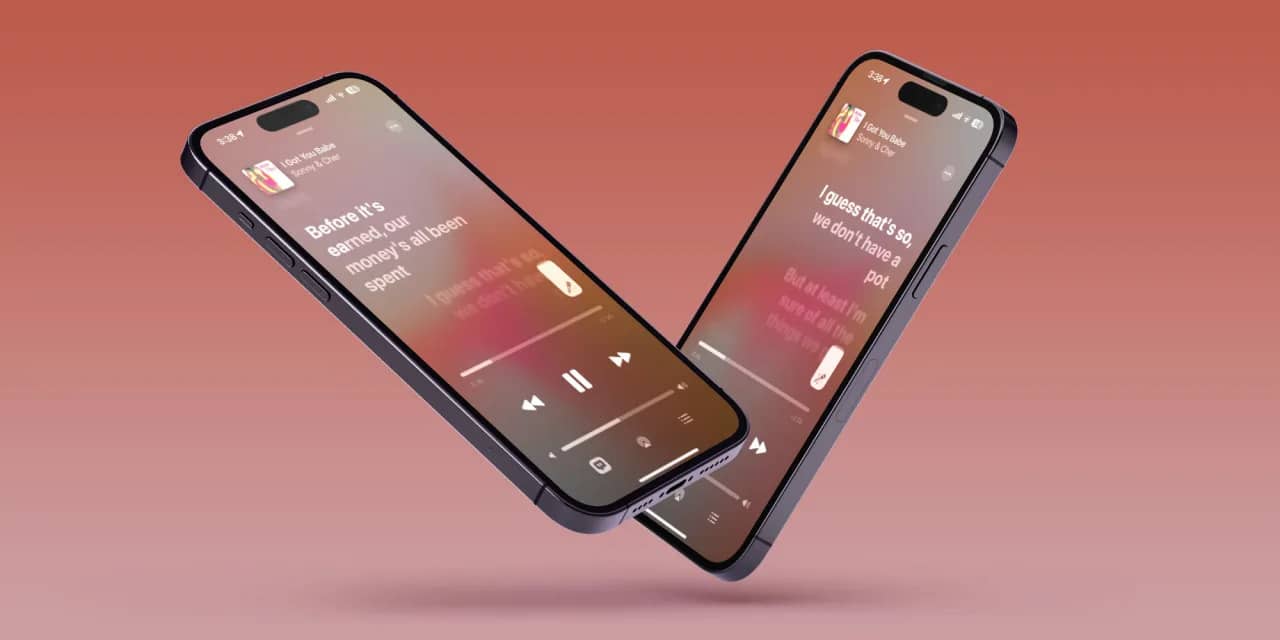
To use Apple Music Sing, play a song, tap the lyrics button, tap the microphone icon and drag the vocal volume slider up or down; duet songs split each singer's lyrics between the left and right sides.
Apple Music Sing works on iPhone 11 and later, iPad (third generation and later) on iPadOS 16.2 and the 2022 Apple TV 4K; Android devices can see lyrics but not Sing.
Contents6 sections
Apple Music is now a karaoke machine! Apple Music Sing, which arrives with iOS 16.2 (and the corresponding versions of macOS and tvOS), enhances the lyrics feature that lets you read along with lyrics in the Music app. There is also a new volume control slider that lets you reduce the vocal track, so you can sing it yourself. Available only to Apple Music subscribers, this feature is sure to be a hit for singing along to songs during the holidays. What is Apple Music Sing? How do you use it? Which devices can use it? All of that and more in our article.

What Is Apple Music Sing?
Apple Music Sing is a karaoke-style feature built into Apple Music's existing lyrics feature, which shows the lyrics of millions of Apple Music tracks. Now, when you access those lyrics, you will see a small volume slider with a small microphone icon. The vocal track is isolated from the rest of the song, and with Sing its volume can be adjusted. To be able to sing on your own or to mix the track's vocals with your own voice as you like, tap the volume slider and drag it all the way down.
Just like in karaoke, the lyrics are highlighted in real time and indicate when you should sing. But Sing is a bit smarter, since it offers a Duet view that separates the lyrics so everyone knows their part if there is more than one singer. Background vocals are also highlighted independently of the main vocal.
Apple has not officially said which tracks will have this feature beyond "tens of millions of songs". Or you can go to the Browse section in Apple Music and look at the Apple Music Sing section, where you can find all kinds of playlists, a video tutorial with Travil Mills, and Sing-enabled songs organized by genre and decade.
How Do You Use Apple Music Sing?
Once your iPhone or iPad is updated to iOS/iPadOS 16.2 (or the latest Apple TV 4K), you will be able to access the new Apple Music Sing feature. Here is how to use it.
- Open the Apple Music app and choose a song to play. With the iOS 16.2 update, there is now a Sing section that can be found in the Browse tab. If you like, choose a song from here.
- Press play on the song and, when it starts playing, tap the lyrics button in the lower left corner (the one with the small quotation mark icon).
- On the right side, you will see a small microphone icon with stars around it (songs that do not have the Sing feature will not show this icon). Tap this icon to turn on the Sing feature.
- Now, you can tap the volume of the vocal track and drag it down or up to sing along with the lyrics, which will be highlighted with the beat and when you should sing.
- To turn off Apple Music Sing, just tap the Sing icon again, or you can also tap the lyrics icon.
In duet songs, the lyrics of each singer's part will be split across the right and left sides of the screen.
- For Apple TV 4K (2022) users, the process is much the same, except that you use the Apple Remote to select and control the volume.
Which Devices Can Use Apple Music Sing?
Apple Music Sing is accessed through the Music app and is available on iPhone 11 and later running iOS 16.2, iPads running iPadOS 16.2 (third generation and later), and the latest 2022 Apple TV 4K model.
Currently, Android devices with Apple Music installed can see the lyrics but cannot access the Sing feature. The full list of compatible devices is below. If automatic updates are not enabled on your iPhone or iPad, here is how to update them to the latest operating system version.
- Open the Settings app on your iPhone or iPad (the small gear icon.)
- Scroll down a bit and tap General and then Software Update.
- If an update is available, tap Download and Install . Enter your passcode and confirm.
Here is the full list of devices compatible with Apple Music Sing:
iPhone
iPhone 11, iPhone 11 Pro, iPhone 11 Pro Max, iPhone 12 mini, iPhone 12, iPhone 12 Pro, iPhone 12 Pro Max, iPhone 13 mini, iPhone 13, iPhone 13 Pro, iPhone 13 Pro Max, iPhone 14, iPhone 14 Plus , iPhone 14 Pro, iPhone 14 Pro Max, iPhone SE (3rd generation, 2022)
iPad
iPad 9, iPad 10, iPad mini 6, iPad Air 4, iPad Air 5, M1 iPad Pro, M2 iPad Pro
Apple TV
Apple TV 4K (2022)
Frequently asked questions
Questions answered in this article
What Is Apple Music Sing?
Apple Music Sing is a karaoke-style feature built into Apple Music's existing lyrics feature, which shows the lyrics of millions of Apple Music tracks. Now, when you access those lyrics, you will see a small volume slider with a small microphone icon. The vocal track is isolated from the rest of the song, and with Sing its volume can be adjusted. To be able to sing on your own or to mix the track's vocals with your own voice as you like, tap the volume slider and drag it all the way down. Just like in karaoke, the lyrics are highlighted in real time and indicate when you should sing. But Sing is a bit smarter, since it offers a Duet view that separates the lyrics so everyone knows their…
Go to sectionHow Do You Use Apple Music Sing?
Once your iPhone or iPad is updated to iOS/iPadOS 16.2 (or the latest Apple TV 4K), you will be able to access the new Apple Music Sing feature. Here is how to use it. In duet songs, the lyrics of each singer's part will be split across the right and left sides of the screen.
Go to sectionWhich Devices Can Use Apple Music Sing?
Apple Music Sing is accessed through the Music app and is available on iPhone 11 and later running iOS 16.2, iPads running iPadOS 16.2 (third generation and later), and the latest 2022 Apple TV 4K model. Currently, Android devices with Apple Music installed can see the lyrics but cannot access the Sing feature. The full list of compatible devices is below. If automatic updates are not enabled on your iPhone or iPad, here is how to update them to the latest operating system version. Here is the full list of devices compatible with Apple Music Sing:
Go to sectionLoL, TFT ve VALORANT sever bir oyun sever ve oyuncu. Mobil platformlarda ise tam bir Clash of clans hastası.


