
Minecraft command block guide: how to get and use one
Minecraft command block guide: how to get one, block types and settings, your first chain, example commands and how to enable them on a server.

6 min read

Contents12 sections
A Minecraft command block is a special block that runs commands for you. According to Microsoft's official command block guide, these blocks are powered by redstone and run the same commands you would type in chat, automatically.
This guide shows how to get one, what each setting does and how to build your first chain. If you are new to commands, start with our list of the most useful Minecraft commands.
How do you get a Minecraft command block?
Command blocks are not in your inventory by default. You can only get them with a command, and cheats must be on first.
- Turn on cheats in the world settings. It is called "Allow Commands" in Java and "Activate Cheats" in Bedrock.
- In Bedrock, check that "Command Blocks Enabled" is on in the same menu.
- Switch to Creative mode:
/gamemode creative - Type this in chat:
/give @s minecraft:command_block
Microsoft's Bedrock example is /give @p command_block. In Java, the block also shows up in the Creative inventory if the Operator Items Tab setting is on. The Minecraft Wiki command block page has more detail.
Minecraft command block at a glance
- You can only get a command block with a command.
- Editing one needs Creative mode and operator rights.
- There are three types: Impulse, Chain and Repeat.
- It runs on a redstone signal or with the Always Active setting.
- The slash before a command is optional.
What are the command block types?
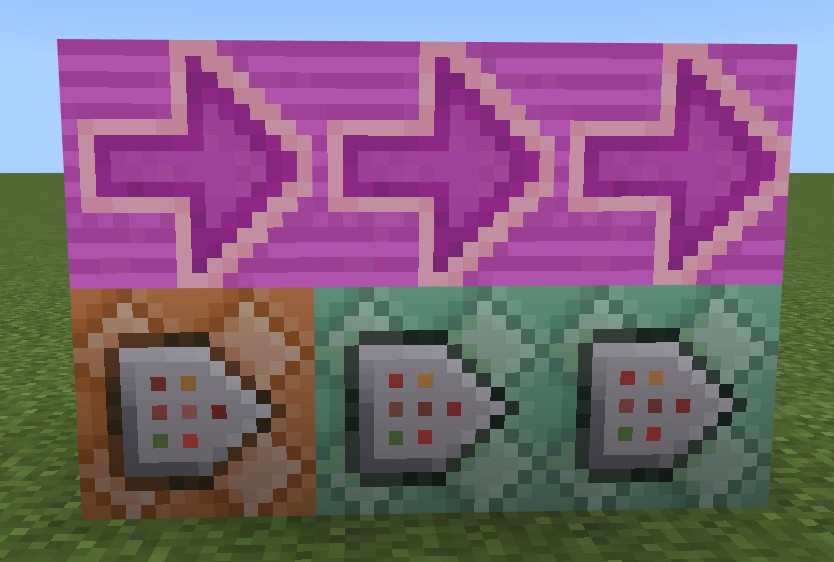
Right-click the block to open its settings. The most important one is the block type. Each type has its own color.
| Type | Color | What it does |
|---|---|---|
| Impulse | Orange | Runs the command once when powered |
| Chain | Cyan | Runs when the block pointing into it runs |
| Repeat | Purple | Runs every game tick while powered |
Minecraft runs at 20 ticks per second. A Repeat block can run a command 20 times a second, so be careful with reward commands.
The other two settings are:
- Condition: Conditional runs only if the block behind it succeeded. Unconditional always runs.
- Redstone: Needs Redstone waits for a signal. Always Active runs without one.
Bedrock also has Delay in Ticks and Execute on First Tick. These set how long the block waits before it runs.
How do you build your first command block chain?
Microsoft's guide has a simple reward loop. A player gets one emerald for placing a diamond block in a set spot. Here are the steps:
- Set the first block to Repeat and Always Active. Command:
/testforblock 0 4 0 diamond_block - Place a second block where the arrow points. Set it to Chain, Conditional and Always Active. Command:
/testfor @p[tag=!placed_block] - The third block uses the same settings:
/give @p emerald - The fourth block closes the loop:
/tag @p add placed_block
Without the last step the player gets 20 emeralds a second. The tag makes sure the reward is given once. This example is for Bedrock. In Java, the block check is done with /execute if block.
Knowing coordinates makes these commands easier. To share your world, see our guide on how to find your Minecraft seed.
What commands can you put in a command block?
Almost any command that works in chat also works in a command block. The examples below work in both editions.
| Goal | Example command |
|---|---|
| Welcome message | /say Welcome to the server! |
| Make it day | /time set day |
| Clear the weather | /weather clear |
| Teleport to spawn | /tp @p 0 64 0 |
| Fill an area | /fill ~1 ~ ~1 ~5 ~3 ~5 stone hollow |
The long "house commands" shared online are made by the community, and many break when the game updates. Building with /fill and /clone is a safer choice.
For colored text, our Minecraft color codes list helps. If you plan to summon villagers for a trading hall, read our guide to Minecraft villager professions.
How do you enable command blocks on a server?
Command blocks are off by default on Java servers. You need to set enable-command-block=true in the server.properties file. The person editing the block must also be an operator in Creative mode.
Newer Java versions also need the command_blocks_work game rule to be on. In Bedrock, it is the "Command Blocks Enabled" box in the world options. For a free server, see our guide to free Minecraft server hosting with Aternos.
One more warning. According to Microsoft's commands documentation, turning on cheats in Bedrock disables achievements in that world. If you hunt achievements, test command blocks in a separate world.
Frequently asked questions
Can you get a Minecraft command block in Survival?
No. A command block cannot be crafted or mined. You can only get one with a command such as /give, and you need Creative mode and operator rights to edit it.
Do commands in a command block need a slash?
No. A command block runs the command without the leading slash. Adding one still works.
Why is my command block not working?
The usual causes are cheats being off, command blocks being disabled in the world, or the block not getting a redstone signal. On a Java server, enable-command-block must be set to true in server.properties.
Are command blocks the same in Java and Bedrock?
The basics are the same. Both have three block types and the condition setting. Bedrock adds tick delay and execute on first tick options, and some commands are written differently.
Sources
Frequently asked questions
Questions answered in this article
- How do you get a Minecraft command block?
- What are the command block types?
- How do you build your first command block chain?
- What commands can you put in a command block?
- How do you enable command blocks on a server?
- Can you get a Minecraft command block in Survival?
- Do commands in a command block need a slash?
- Why is my command block not working?
Sources
External links cited in this article
- 01According to Microsoft's official command block guide,learn.microsoft.com (opens in a new tab)
- 02Minecraft Wiki command block pageminecraft.wiki (opens in a new tab)
- 03server.properties fileminecraft.wiki (opens in a new tab)
- 04Mojang / Minecraft.netminecraft.net (opens in a new tab)
- 05According to Microsoft's commands documentation,learn.microsoft.com (opens in a new tab)
Newsletter
The week's biggest gaming news, every Friday morning
One email every Friday: the week's most-read stories and what's new. No spam, unsubscribe anytime.
LoL, TFT ve VALORANT sever bir oyun sever ve oyuncu. Mobil platformlarda ise tam bir Clash of clans hastası.