

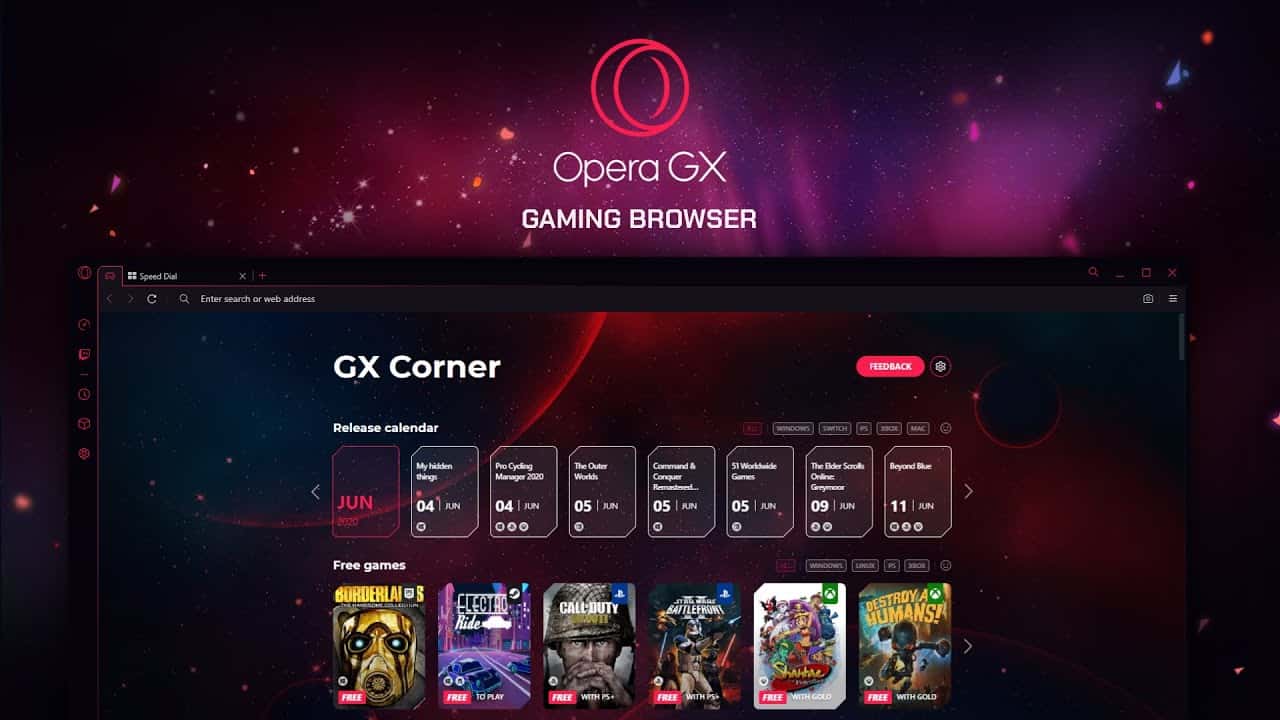
Opera GX: The Gaming Browser's Features and Requirements
Opera GX is a free, Chromium-based gaming browser for Windows and macOS that needs just 4GB of RAM and now supports adding Discord to its sidebar.
- Opera GX is a free, Chromium-based desktop browser built specifically for gamers on Windows and macOS.
- Opera GX requires only 4GB of RAM and also has Android and iOS apps.
- A new update lets users add Discord to Opera GX's sidebar alongside existing apps like Telegram and WhatsApp.
 What Is Opera GX and How Do You Use It?
Opera GX is a free desktop web browser for gamers, made for Windows computers. Despite its name, it's not Steam's built-in browser, which runs inside the Steam interface — Opera GX is a browser designed to be used while gaming. That said, it's not available for use on game consoles like Xbox One or PlayStation 4. Like the standard version of Opera, Opera GX is Chromium-based, meaning it's built on the open-source Chromium software that also underlies the Google Chrome web browser. Opera GX targets PC gamers with tools meant to improve their gaming sessions, without hurting game performance.
What Are Opera GX's System Requirements? How Many GB?
Opera GX can be used on both Windows 10 and macOS. It also has Android and iOS apps like other regular browsers, and you'll need 4GB of RAM.
What Features Does Opera GX Have?
The moment you open the browser, you'll have no trouble telling it's built for gamers. Companies generally like to design gaming chairs, mice or PC cases as gamer-friendly with bright neon colors. Opera GX hasn't skipped this detail either, dressing up its interface with colorful lines over a black background. That's not all — you can also personalize your browser's theme color with different options like Ultraviolet or Purple Haze. Another feature of the browser is that dark mode is automatically detected as the default when switching to other compatible websites. This gives you a more enjoyable experience as you browse between pages. Opera GX doesn't just offer a visual experience, but a sound experience too. As you browse, it generates an electronic sound whose intensity matches what you're doing, and it also changes based on your actions.
 Features, features and more features... The quick search start page also has a gamer-focused design. Opera GX offers you a search bar and recommended websites, but it also offers a release date calendar and content feed you can customize based on the platform you choose.
Finally, going beyond personalizing tools, the side menu lets you easily create workspaces with the pages you're looking for, save them and access them quickly. At the same time, you have the option to integrate messaging apps like Facebook Messenger, Twitter and WhatsApp into the side menu. Opera GX also organizes your downloads based on the file type you install and intelligently suggests which file to attach to an email without you having to open any other page.
While Opera GX offers nearly limitless features, we wanted to share a few of them with you. We're sure that once you start exploring the browser, you'll come across even more features!
Is Opera GX Paid or Free?
Opera GX is completely free for users. Opera, which had already significantly grown its user base in a short time thanks to its free VPN service, has pulled off a world first. A browser made especially for gamers, Opera GX, has been released!
How Do You Add Discord to Opera GX?
Opera already lets you add various messaging apps like Telegram and WhatsApp to GX's sidebar. With the new update, users will now also be able to add Discord to the browser's sidebar after clicking the menu icon in the bottom-left corner.
Comments (0)
Log in to leave a comment giriş yap.
No comments yet. Be the first!
Related Posts
All Latest News →
Turkish Wordle Word of the Day Archive
Turkish Wordle's word for December 6, 2024 is "zülüf," and this archive lists every past daily answer plus tips for solving the puzzle.

Coin Master Free Spins Hack: Unlimited Spin Codes
Coin Master's free spins codes refresh daily and can be redeemed for 25 extra spins each, alongside tips like daily gifts, social follows, and friend invites to earn even more.
TFT 2025 Patch Schedule
Teamfight Tactics' projected 2025 patch schedule runs from Patch 14.1 on January 10 through Patch 15.1 on January 15, 2026, roughly every two weeks.