How Do You Use Split Screen in Fortnite? (June 2022)
As of June 2022, Fortnite split screen works only on PlayStation and Xbox: log in the second player at the lobby with Triangle (PlayStation) or Y (Xbox), and it is limited to Duos and Squads in…

2 min read
In brief
AI summaryAs of June 2022, Fortnite split screen was re-enabled by Epic Games after the v19.01 update in Chapter 3 Season 1, letting two players share one console.
To use Fortnite split screen, turn on the second controller in the main lobby and press Triangle (PlayStation) or Y (Xbox) to log Player Two in.
In June 2022, Fortnite split screen was available only on PlayStation and Xbox, in Battle Royale Duos and Squads; Epic had not announced support for PC, Nintendo Switch or mobile.
Contents3 sections
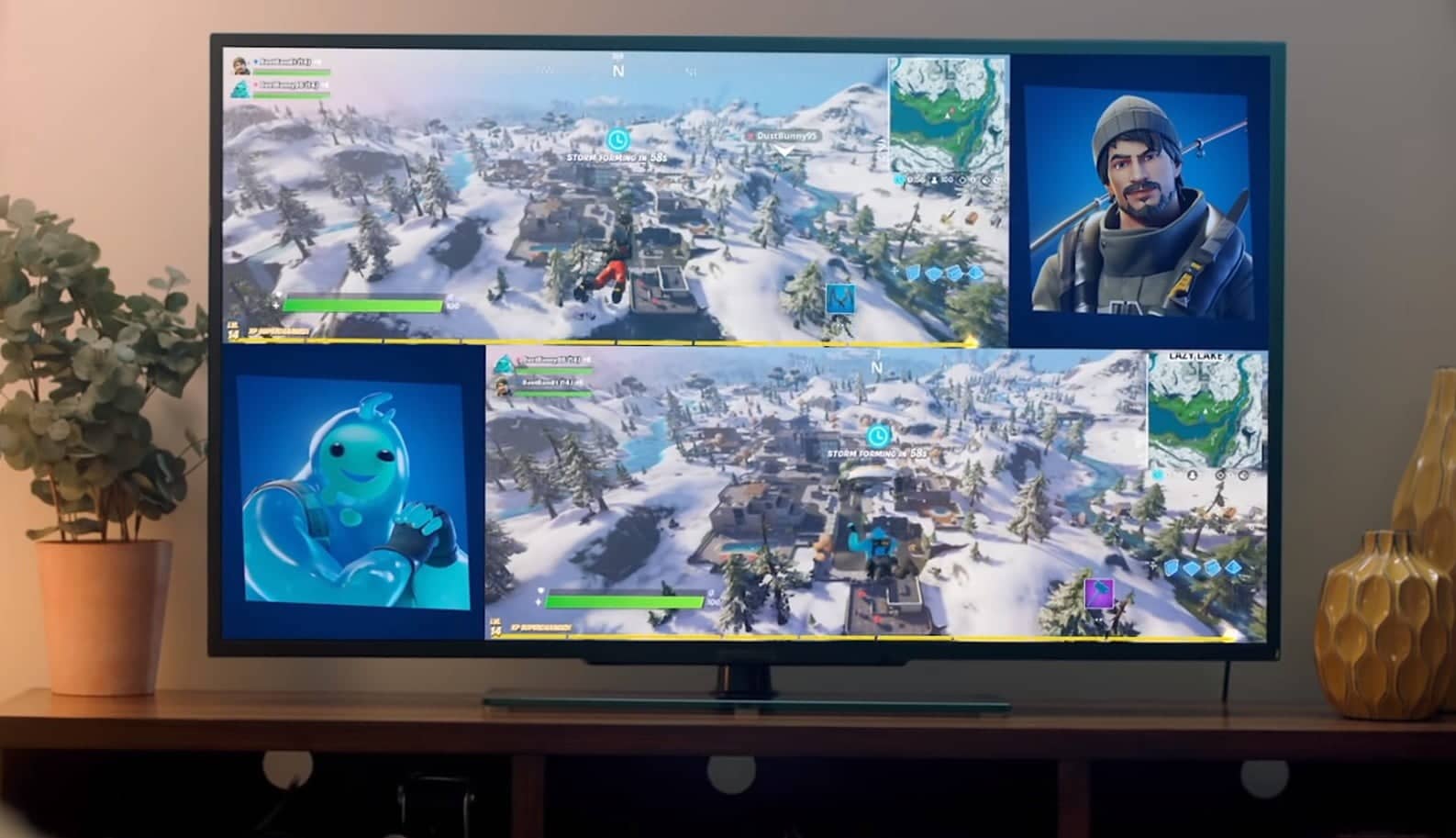
Going back to Fortnite's big Chapter 2 revamp, the addition of split screen marked the first time such a thing had come to the game, and it is probably one of the biggest changes to how Battle Royale is played, alongside the movement mechanics added earlier. Using split screen, players can jump onto the Fortnite map together at home at the same time, with each player's view shown on one half of the screen. However, most people don't even know this feature is in the game, so we have prepared a handy guide to help you get started. If you want to learn how to do split screen in Fortnite, we have all the information you need about the same system and how to play together on one screen.

How Do You Use Split Screen Mode in Fortnite?
Yes, you can play split screen in Fortnite. After the v19.01 update in Chapter 3 Season 1, the ability to play in split screen mode was re-enabled by Epic Games, so you can once again hop on the Battle Bus to play a few rounds with friends at home. To enable the feature in your game, follow these steps:
- Go to the game's main lobby on the main player's account.
- Turn on the second controller and log in to the second player's account when prompted.
- At the bottom of your screen, you will see the option to press your console's Triangle (PlayStation) or Y (Xbox) button to log Player Two into the game.
- After that, both players should appear in the game's lobby area.
- That's it. Enjoy split screen Fortnite!
It is worth noting that if one player disconnects, the game session will end even if the other player stays in the game. Players' inventories will remain separate, meaning you still need to gather your own items to craft and upgrade them.
Which Modes Can You Play With Split Screen?
As of now, split screen is only available in the Duos and Squads modes in Battle Royale, with two players connected to the same console. This also applies to Creative, Limited Time Modes (LTMs) and Save the World. However, cross-play between console platforms allows shared screens.
When Is Split Screen Coming to Switch and PC?
Currently, split screen is only available on PlayStation and Xbox consoles. PC, Nintendo Switch and mobile devices do not support this function, and Epic has not said it will be enabled on these platforms soon. That said, we will make sure to update you here with something new as any new information emerges.
Frequently asked questions
Questions answered in this article
How Do You Use Split Screen Mode in Fortnite?
Yes, you can play split screen in Fortnite. After the v19.01 update in Chapter 3 Season 1, the ability to play in split screen mode was re-enabled by Epic Games, so you can once again hop on the Battle Bus to play a few rounds with friends at home. To enable the feature in your game, follow these steps: It is worth noting that if one player disconnects, the game session will end even if the other player stays in the game. Players' inventories will remain separate, meaning you still need to gather your own items to craft and upgrade them.
Go to sectionWhich Modes Can You Play With Split Screen?
As of now, split screen is only available in the Duos and Squads modes in Battle Royale, with two players connected to the same console. This also applies to Creative, Limited Time Modes (LTMs) and Save the World. However, cross-play between console platforms allows shared screens.
Go to sectionWhen Is Split Screen Coming to Switch and PC?
Currently, split screen is only available on PlayStation and Xbox consoles. PC, Nintendo Switch and mobile devices do not support this function, and Epic has not said it will be enabled on these platforms soon. That said, we will make sure to update you here with something new as any new information emerges.
Go to section