Valorant Crosshair Color Codes: Hex List and Pro Codes
Valorant crosshair color codes in hex, how to enable a custom color, how to import a profile code, and current pro crosshair codes with sources.

In brief
AI summaryVALORANT added custom crosshair colors in Patch 5.04, letting players enter hex codes for their crosshair.
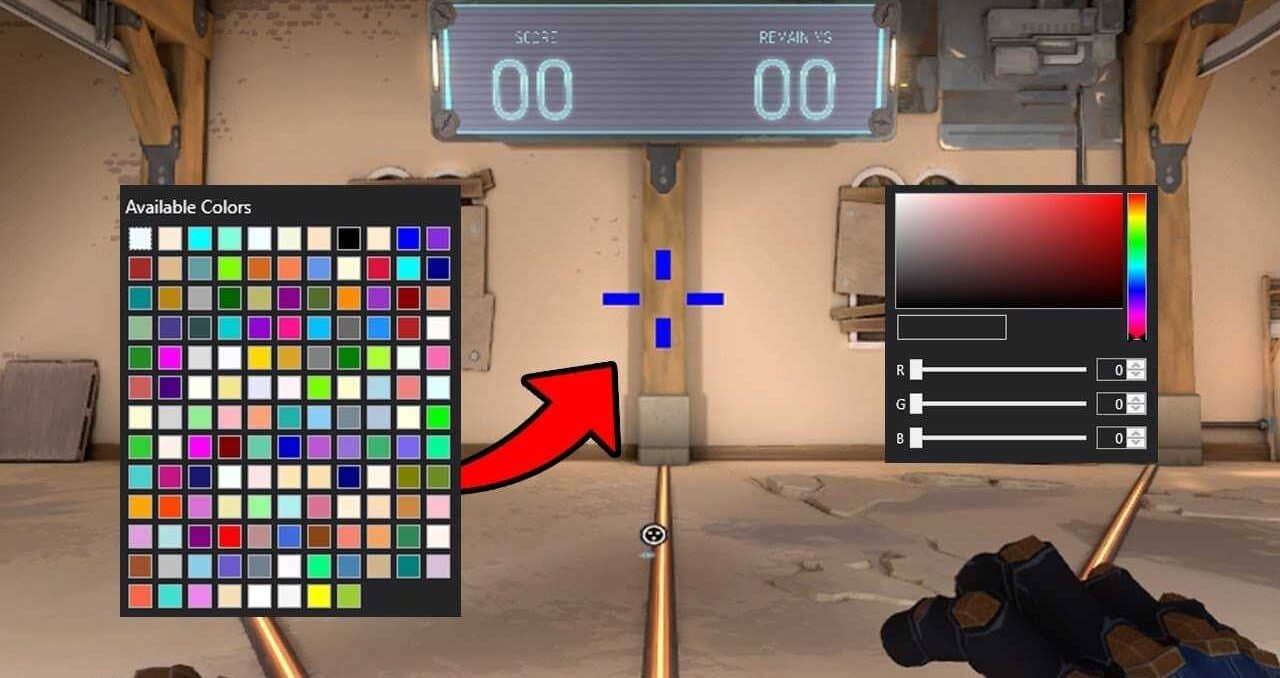
Custom colors are set from the Crosshair tab in settings by selecting Primary, then Crosshair Color, then Custom.
Custom color codes currently apply only to weapons, not characters or equipment, and can be bought with real money.
Contents11 sections
Valorant crosshair color codes are 6-digit hex values: set the crosshair color to Custom under Settings > Crosshair > Primary, type something like #00FFFF and you get a cyan crosshair. Below you will find the most useful hex codes and current pro crosshair codes.
This guide reflects the live client after patch 13.08, released on October 13, 2026. Custom colors have been in the game since patch 5.04 and the way they work has not changed since.
How to use a custom crosshair color in Valorant
Riot's patch 5.04 notes describe the feature simply: pick Custom from the crosshair color dropdown and enter a 6-digit hex (RGB) value. An invalid value makes the crosshair revert to its previous color. The steps:
- Press Esc in game and open Settings.
- Go to the Crosshair tab.
- On the Primary tab, choose Custom from the crosshair color dropdown.
- Type the hex code (for example 00FFFF) into the box and press Enter.
The same color option exists separately on the Aim Down Sights and Sniper Scope tabs, so your ADS crosshair can have its own color.
Valorant crosshair color codes list
Hex codes are fixed color values and do not change with patches. The table collects the standard web colors that work best as a crosshair:
| Color | Hex code | Note |
|---|---|---|
| Cyan | #00FFFF | High contrast on most maps; common among pros |
| Turquoise | #40E0D0 | A softer take on cyan |
| Deep sky blue | #00BFFF | Darker than cyan on bright walls |
| Neon green | #39FF14 | The classic glowing green |
| Lime | #00FF00 | Pure green, close to the default green |
| Chartreuse | #7FFF00 | Green leaning yellow |
| Spring green | #00FF7F | Green leaning blue |
| Yellow | #FFFF00 | Pops on dark backgrounds |
| Gold | #FFD700 | Warmer than yellow |
| Magenta | #FF00FF | Rare in map palettes, hard to lose |
| Hot pink | #FF69B4 | Softer than magenta |
| Deep pink | #FF1493 | Vivid without being harsh |
| Red | #FF0000 | Can clash with a red enemy highlight |
| Orange | #FFA500 | Good contrast on blue-toned areas |
| White | #FFFFFF | Cleanest option with a black outline |
| Black | #000000 | Sharp on bright walls, vanishes in shadows |
| Purple | #800080 | Dark, use with an outline |
| Violet | #8F00FF | Brighter than purple |
To find your own shade, pick a color in any web color picker, copy the 6-digit hex value shown at the top and paste it into the game. There is no color wheel in the client, so an outside picker is the way to go.
Which color is easiest to see?
The best color depends on the map and your eyes, but a few rules hold up:
- Avoid your enemy highlight color. The enemy highlight setting under Settings > General > Accessibility offers Red, Purple (Tritanopia) and two Yellow options (Deuteranopia, Protanopia). If enemies glow red, a red crosshair can disappear on them.
- Pick colors that rarely appear on maps. Cyan, magenta and neon green stand out against most wall and floor textures.
- Use an outline. Colors like white or purple stay readable on any background with a black outline.
How to import a crosshair profile code
You can share a whole crosshair, not only its color. A profile code is a string starting with "0;P;..." that stores color, line length, thickness and outline. Current guides describe the import like this:
- Copy the full code.
- Open Settings > Crosshair.
- Click the down-arrow icon next to the crosshair profile field (import profile code).
- Paste the code, click Import, then name and save the profile.
To share your own crosshair, the up-arrow icon in the same spot copies its code to your clipboard. The game stores up to 15 crosshair profiles. While spectating, typing /crosshair copy or just /cc saves the spectated player's crosshair as a new profile.
Inside a code, the c; value is the preset color slot, while u; carries a custom hex color (for example u;FF99FFFF). If you like an imported crosshair but want a different color, just enter a new hex code on the Primary tab.
Current pro player crosshair codes

The codes below were taken from ProSettings.net player pages on October 25, 2026. The last column shows when the site last updated that player's settings. Pros change crosshairs often, so check the preview before you commit.
| Player | Crosshair code | ProSettings updated |
|---|---|---|
| TenZ | 0;s;1;P;c;5;o;0;f;0;0l;2;0v;2;0g;1;0o;1;0a;1;0f;0;1b;0 | Oct 5, 2026 |
| aspas | 0;P;h;0;0l;4;0o;0;0a;1;0f;0;1b;0 | Oct 13, 2026 |
| Derke | 0;P;o;1;0t;1;0l;4;0o;2;0a;1;0f;0;1t;0;1l;1;1o;0;1a;1;1m;0;1f;0 | Oct 19, 2026 |
| cNed | 0;P;h;0;0l;5;0o;0;0a;1;0f;0;1b;0 | Aug 10, 2026 |
| Wo0t | 0;P;c;7;o;1;d;1;0l;0;0o;2;0a;1;0f;0;1b;0 | Jul 13, 2026 |
| Demon1 | 0;p;0;s;1;P;o;1;f;0;0t;1;0l;3;0o;2;0a;1;0f;0;1b;0;A;o;1;0t;1;0l;3;0o;2;0a;1;0f;0;1b;0;S;c;1;o;1 | May 18, 2026 |
Some of these codes carry no color value, in which case the game uses its default color. If you like the shape but not the color, import the code and then enter a hex code from the table above.
If you also fine-tune your setup in Counter-Strike, our CS2 launch options guide covers what still works there.
Frequently Asked Questions
Do custom crosshair colors cost anything in Valorant?
No. The custom crosshair color is a free option in the settings menu. You type a hex code and save it; the store has nothing to do with it.
I entered a hex code but the color did not change. Why?
According to Riot, an invalid value makes the crosshair revert to its previous color. Make sure the code has 6 characters and uses only 0–9 and A–F.
Can I set different colors for ADS and sniper scopes?
Yes. The Primary, Aim Down Sights and Sniper Scope tabs each have their own color option.
Can I copy a pro's crosshair while watching a match?
Yes. Typing /cc in chat while spectating saves the spectated player's crosshair as a new profile.
What is the best crosshair color in Valorant?
There is no single answer. Cyan and white are common among pros. A color that differs from your enemy highlight and does not blend into the maps is the safest starting point.
Frequently asked questions
Questions answered in this article
- How to use a custom crosshair color in Valorant
- Which color is easiest to see?
- How to import a crosshair profile code
- Do custom crosshair colors cost anything in Valorant?
- I entered a hex code but the color did not change. Why?
- Can I set different colors for ADS and sniper scopes?
- Can I copy a pro's crosshair while watching a match?
- What is the best crosshair color in Valorant?
Sources
External links cited in this article
Newsletter
The week's biggest gaming news, every Friday morning
One email every Friday: the week's most-read stories and what's new. No spam, unsubscribe anytime.
LoL, TFT ve VALORANT sever bir oyun sever ve oyuncu. Mobil platformlarda ise tam bir Clash of clans hastası.