

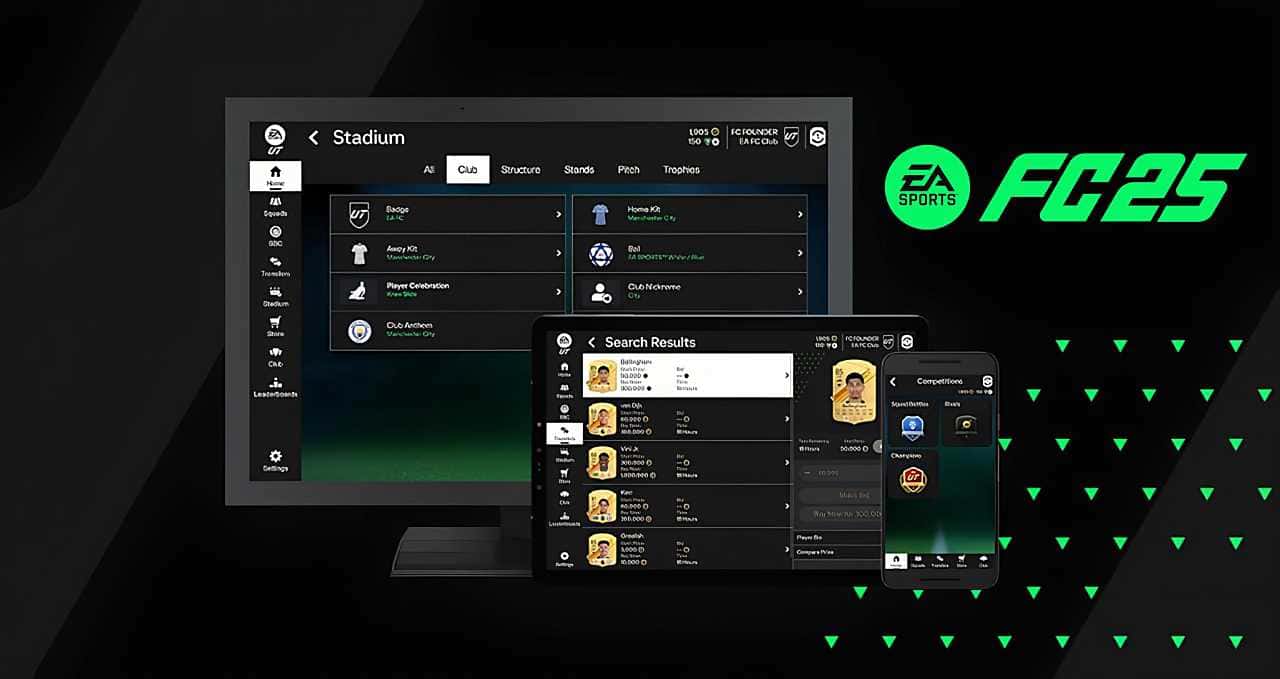
FC 25 Web App: Release Date and Access Guide
The FC 25 Web App goes live September 18, 2024, letting players manage Ultimate Team through a browser, with early access for eligible FC 24 players.
- The FC 25 Web App will go live on September 18, 2024.
- The app lets players manage Ultimate Team, including squads, the Transfer Market, and rewards, through a desktop or laptop browser.
- Early access is offered to FC 24 players who created a UT Club before August 1 and kept their account in good standing.
When Is the FC 25 Web App Coming Out?
Football fans eagerly await it every year, and EA Sports' new football simulation FC 25 arrives with innovative features once again this year. One of those features is the FC 25 Web App. The web app stands out as a platform that lets players manage their Ultimate Team (UT) mode through their desktop or laptop's web browser. But the question on many players' minds is: "When is the FC 25 web app coming out?" In this article, we'll take a detailed look at when and how the FC 25 Web App will become accessible, what features it offers, and how players can make the most of this opportunity.
 When Is the FC 25 Web App Coming Out?
The FC 25 Web App will go live on September 18, 2024. Let's take a closer look at how to access the app and the early access requirements:
What Is the FC 25 Web App?
The FC 25 Web App is a tool that lets you manage Ultimate Team mode through a web browser. With this app, players can control their FC 25 clubs on PlayStation, Xbox, or PC directly from a web browser. Aside from playing matches, you'll be able to do almost everything else you'd do in UT through this platform as well.
The main features offered by the web app include:
- Managing UT Squads: Players can edit their current squads, build concept squads, and share those squads with other players.
- Transfer Market: The app lets players search for, buy, and trade items on the Transfer Market.
- Buying Packs and FC Points: Players can easily buy packs and FC Points from the store through the web app.
- Completing Objectives: Squad-building objectives and squad management goals can be completed.
- Using Rewards: Earned rewards, such as Squad Battles, Rivals, and Champions rewards, can be used.
- Leaderboards and Stadium Customization: Players can check leaderboards and customize their active stadium.
These features let players take part in in-game events and management tasks more quickly and more easily. The web app is only available on desktop and laptop computers, while the FC 25 Companion App is recommended for mobile devices.
You can find our latest articles about the game through this link.
How Do You Access the FC 25 Web App?
The FC 25 Web App offers a big advantage for players who love Ultimate Team mode. However, there are a few requirements for accessing the app. First, players need a UT account and a device with an internet connection. The steps to access the web app are quite simple:
- Open Your Web Browser: Open your browser and type https://www.ea.com/ea-sports-fc/ultimate-team/web-app/ into the address bar.
- Login Verification: Check whether your login verification is turned on. This step matters for your account security.
- Sign In With Your Origin Credentials: Sign in using your EA account credentials.
- Accept the User Agreement: You'll need to accept the user agreement the first time you log in.
Players who follow these steps can access the FC 25 Web App and take advantage of everything Ultimate Team mode has to offer. However, there's one important thing to keep in mind: the FC 25 Web App can't be used while you're logged into Ultimate Team 25 on console or PC. In these cases, you'll need to exit UT, return to the main FC 25 menu, and try logging into the app again.
What Are the Early Access Requirements?
Early access to the FC 25 Web App is only available to players who meet certain conditions. FC 24 players have the chance to get an early start on the new season in the FC 25 Web App. However, this opportunity isn't open to everyone. If you want to take advantage of early access, you'll need to meet the following conditions:
- Creating an Ultimate Team Club: Players need to have created an Ultimate Team Club in FC 24 before August 1. They also need to have logged into UT on their platform.
- Existing Account: The UT 24 account must still exist; players who deleted their account won't be able to access the early start.
- Account Standing: Accounts need to be in good standing; they must not have been banned or otherwise actioned in UT 24.
In short, players who meet these conditions can take advantage of the early access opportunity offered by the FC 25 Web App. In addition, players who didn't pre-order the game will need to log into their console or PC at least once, since they'll continue using the UT Web App after October 14.
For the latest news, don't forget to follow the Gamer Papers website and our social media accounts.
Sources
External links cited in this article
Comments (0)
Log in to leave a comment giriş yap.
No comments yet. Be the first!
Related Posts
All EA FC →
FC 25 Open World Mode: What We Know
EA has confirmed that future EA Sports FC versions will add an NBA 2K "The City"-style open world mode, though no release date has been set yet.

FC 25 Title Update 3 Brings Major Gameplay Changes
FC 25's Title Update 3 weakens the 5-at-the-back formation and trivela shots, reduces lobbed pass accuracy, and fixes Ultimate Team bugs.

How to Do Cole Palmer's Goal Celebration in FC 25
In FC 25, players can trigger Cole Palmer's signature "Cold" goal celebration by pressing X on PlayStation or A on Xbox right after scoring with him.