Clash of Clans New UI Guide: Where Are the Buttons?
Clash of Clans new UI guide: where the Battle and Build buttons, Battle Log, Edit Army and every upgrade moved, based on Supercell's official button map.

5 min read
Contents12 sections
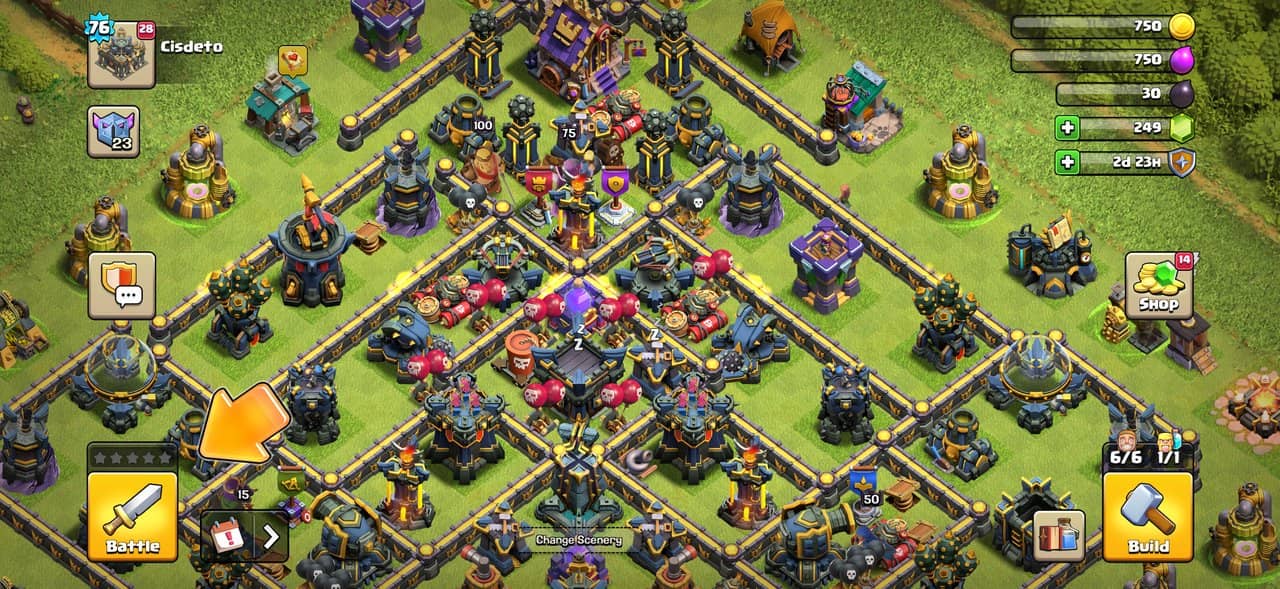
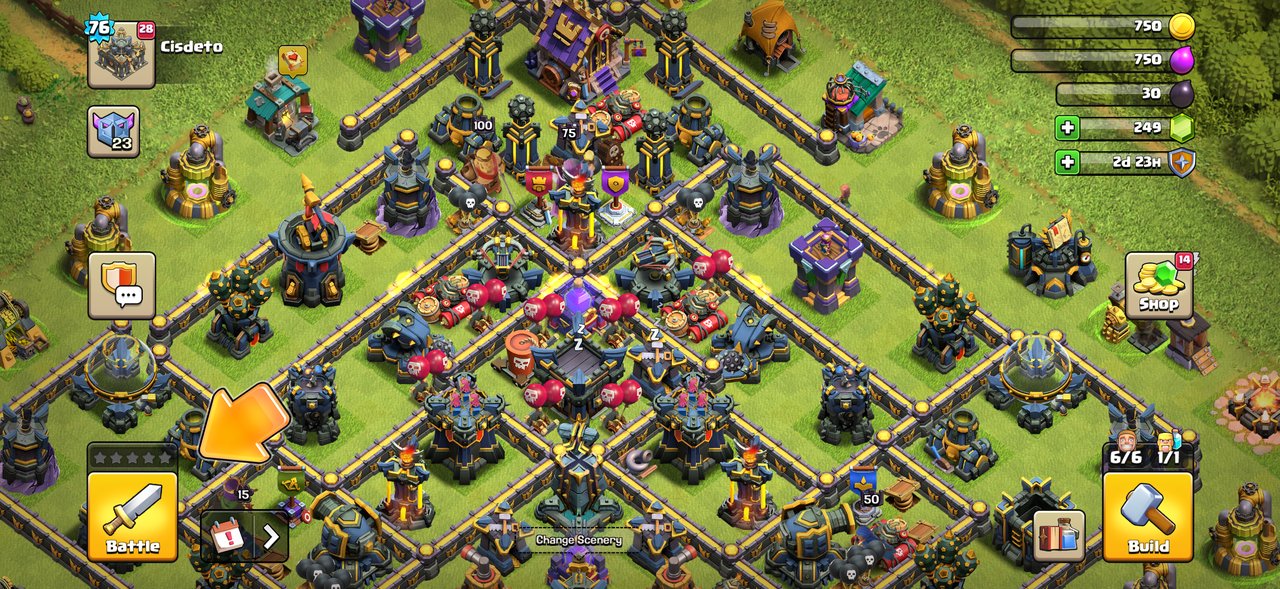
The Clash of Clans new UI changes the village screen from the ground up. In the redesign Supercell announced on October 8, Battle sits bottom left and Build sits bottom right. The Battle Log, army editing and every upgrade now live inside those two buttons.
Supercell says the goal was not fewer buttons but the right buttons in the right place. Almost nothing was removed; things just moved. Below we turn the official "where did my buttons go" map into a quick reference.
Why did the Clash of Clans new UI arrive?
The old interface was built for a much smaller game. Hero Equipment, Pets, Magic Items and the Clan Capital were bolted on over the years. The result was clutter, with everyday tasks buried inside buildings. Supercell treats the new design as a foundation for future features, not a finished product.
What is inside the Battle button?
The Battle button is now the hub for everything combat. The Battle Log, Edit Army and the battle menu all live here. With training times gone and an army review screen before every battle, daily trips to the Army Training menu are no longer needed.
- When Revenge is available, the Battle button shows a flaming sword.
- When a live replay is running, it shows an eye icon.
- Battle Boost and Magic Potion states also show on this button.
What is inside the Build menu?
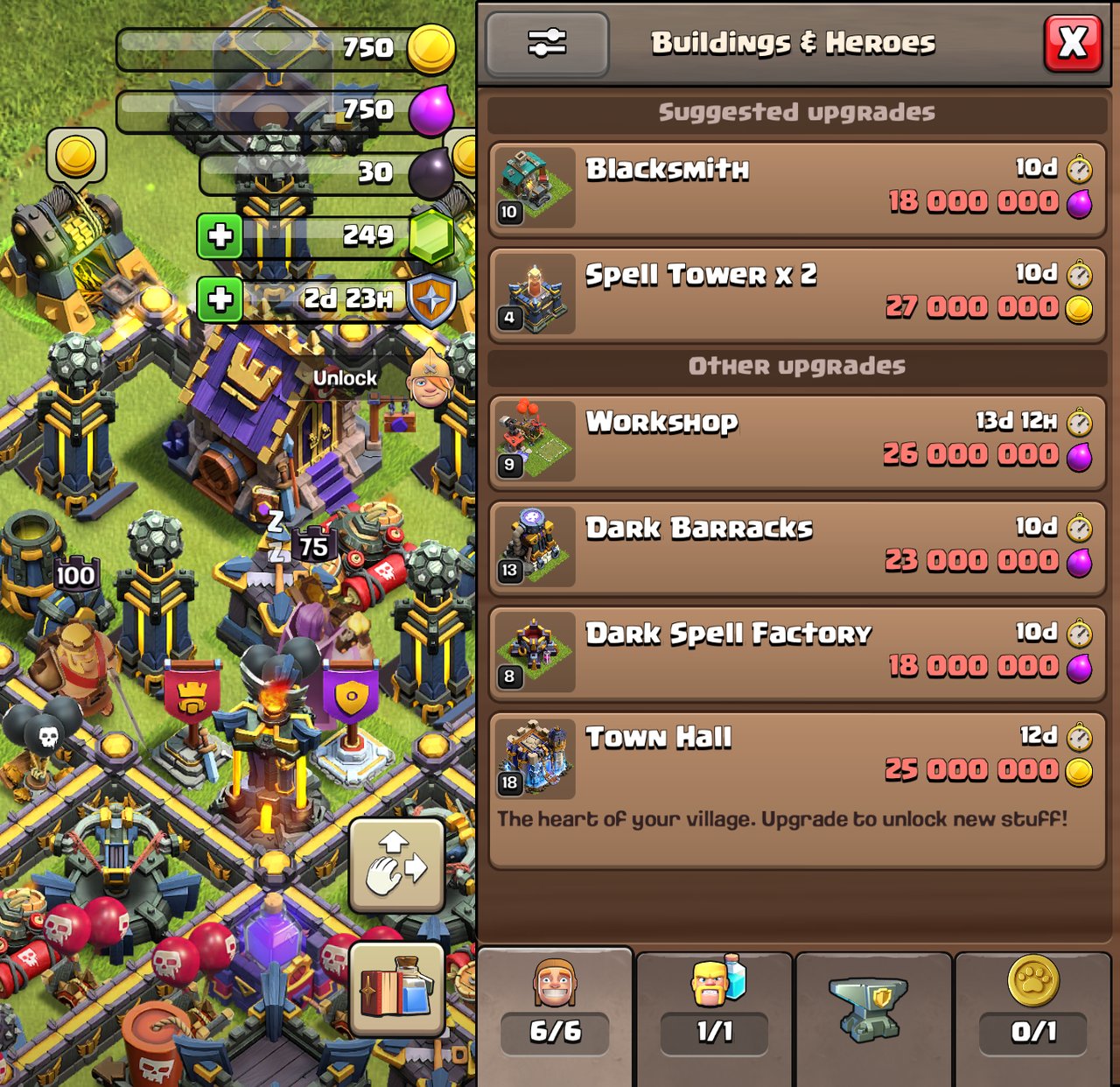
The Build button is the single home for everything you upgrade and edit on your base. It has four tabs:
- Building and Heroes: every building and Hero upgrade, plus new buildings.
- Army Upgrades: everything that used to mean tapping the Laboratory.
- Hero Equipment: everything that used to mean tapping the Blacksmith.
- Hero Pets: everything that used to mean tapping the Pet House.
Small details worth knowing
- Tapping an upgrade card pans the camera to that building and opens the upgrade confirmation.
- Tapping a locked item shows the building that gates it.
- By default, upgrades in progress sort to the top, shortest timer first.
- Filters change per tab, and you can sort by cost in either direction.
- Recommendations were not removed; they sit in a "Recommended" section inside Build.
Where did my buttons go?
| What you're looking for | Where it is now |
|---|---|
| Battle Log | Inside the Battle button |
| Revenge and live replay | Battle button state + Battle Log inside the Battle menu |
| Edit Army | Inside the Battle button |
| Edit Layout | Appears bottom right when the Build menu is open |
| New buildings and Hero upgrades | Build → Building and Heroes |
| Laboratory upgrades | Build → Army Upgrades |
| Hero Equipment | Build → Hero Equipment |
| Pets | Build → Hero Pets |
| Builder Apprentice / Lab Assistant | Build → Building and Heroes / Army Upgrades |
| Magic Items | Dedicated button |
| Settings, Supercell ID | Profile → Settings |
| Clan info, Town Hall level | Profile button |
| Clan Wars and CWL | Card in Clan chat; dedicated button during war |
| Inbox and Event Hub | Event tray, always pinned |
| Gold Pass | Dedicated button |
| Shield | Next to your resources |
The Gold Pass now has its own button. For how the free and paid tracks differ, see our Season Challenges guide.
Builder Base and Clan Capital
Builder Base gets the same improvements, but its Build menu has two tabs instead of four. Clan Capital only gets a visual pass to match the new button style. Supercell plans a proper Capital rework in a future update.
How did Supercell respond to player feedback?
On October 15 Supercell published a follow-up post. The XP bar was not removed; it moved to your Profile. Scaling options and filters that reset every session are being looked at. The extra taps for Clan Castle requests, account switching, the Layout Editor and Revenge are being reviewed one by one. Supercell also confirmed a bug that showed a false "FREE" alert on the Shop, which was fixed.
Just starting out? Our beginner's guide to the Town Hall covers the basics.
Frequently asked questions
Can you switch back to the old Clash of Clans interface?
No. Supercell says there is no way back to the old interface. It wants to add interface customization but cannot promise a date.
Where are the Battle Log and Revenge in the new UI?
The Battle Log is inside the Battle button. When Revenge is available the Battle button shows a flaming sword, and during a live replay it shows an eye icon.
Where did new buildings and Laboratory upgrades go?
New buildings are in the Build menu under Building and Heroes. Laboratory upgrades are under Army Upgrades, Blacksmith upgrades under Hero Equipment and Pet House upgrades under Hero Pets.
Sources
- Supercell: We've revamped the Clash of Clans User Interface (Oct 8, 2026)
- Supercell: A Word on the new Home Village Screen (Oct 15, 2026)
- Supercell Fan Content Policy
This material is unofficial and is not endorsed by Supercell and Supercell does not take responsibility for it. For more information see Supercell's Fan Content Policy: www.supercell.com/fan-content-policy.
Frequently asked questions
Questions answered in this article
- Why did the Clash of Clans new UI arrive?
- What is inside the Battle button?
- What is inside the Build menu?
- Where did my buttons go?
- How did Supercell respond to player feedback?
- Can you switch back to the old Clash of Clans interface?
- Where are the Battle Log and Revenge in the new UI?
- Where did new buildings and Laboratory upgrades go?
Sources
External links cited in this article
Newsletter
The week's biggest gaming news, every Friday morning
One email every Friday: the week's most-read stories and what's new. No spam, unsubscribe anytime.
LoL, TFT ve VALORANT sever bir oyun sever ve oyuncu. Mobil platformlarda ise tam bir Clash of clans hastası.