

FC 27 Lag and Stuttering Fix: PC Performance Guide
FPS drops, stuttering or input delay in FC 27? EA Help's FC 27 PC performance steps, the new graphics presets, the dual-channel RAM check and fixes for network lag.

5 min read

In brief
AI summaryEA recommends lowering the target frame rate, reducing graphics quality and resolution, closing background apps, checking dual-channel RAM, and updating GPU drivers.
FC 27 stuttering can appear as delayed inputs, slow-motion gameplay, or sudden frametime spikes even when average FPS looks normal.
If gameplay is visually smooth but reactions are delayed or players teleport, troubleshoot your network with a wired connection, router restart, and Wi-Fi improvements.
Contents10 sections
For FC 27 stuttering, EA's official advice in order is: lower your target frame rate, reduce graphics quality and resolution, close background apps, check that your RAM runs in dual-channel, and update your graphics driver. If the lag only happens online, look at your network.
FC 27 lag and stuttering: three different symptoms

EA Help's FC 27 PC performance article says performance problems can look like this:
- Delayed inputs, even offline or with low network latency.
- Slow-motion gameplay, even when average FPS looks normal.
- Periodic stuttering or sudden frametime spikes.
EA links these to graphics settings, display resolution, background apps, drivers, power settings, hardware and memory configuration. If you have high ping, packet loss or disconnects, the cause may be your network rather than your PC; we cover that below.
FC 27 PC system requirements
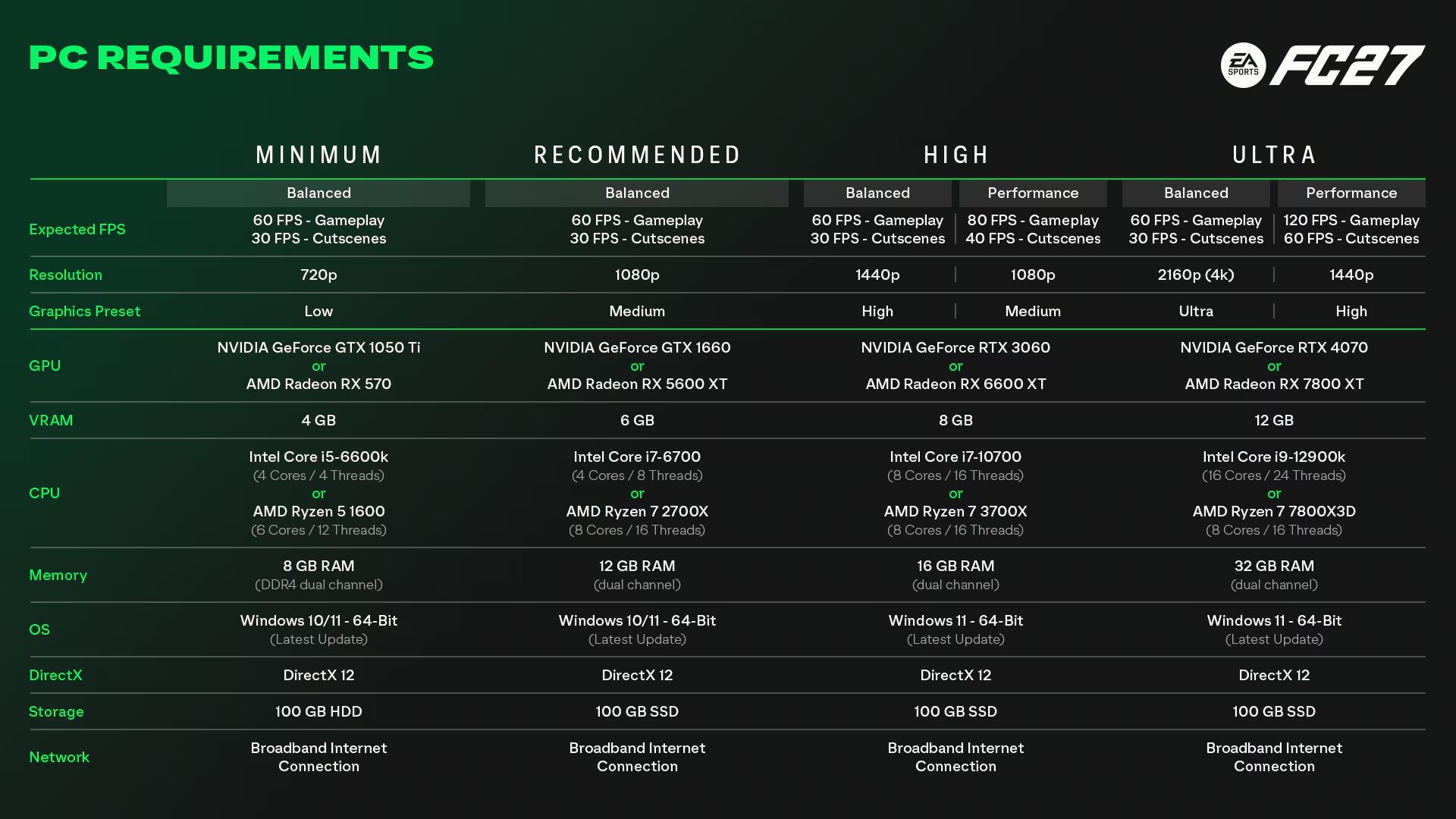
First check which tier your hardware matches. EA Help's official table:
| Tier | Target | GPU | CPU | RAM |
|---|---|---|---|---|
| Minimum | 720p, Low, 60 FPS. | GTX 1050 Ti / RX 570 (4 GB). | i5-6600K / Ryzen 5 1600. | 8 GB dual-channel DDR4. |
| Recommended | 1080p, Medium | GTX 1660 / RX 5600 XT (6 GB). | i7-6700 / Ryzen 7 2700X. | 12 GB dual-channel. |
| High | 1440p, High | RTX 3060 / RX 6600 XT (8 GB). | i7-10700 / Ryzen 7 3700X. | 16 GB dual-channel. |
| Ultra | 2160p, Ultra | RTX 4070 / RX 7800 XT (12 GB). | i9-12900K / Ryzen 7 7800X3D. | 32 GB dual-channel. |
Every tier needs DirectX 12 and 100 GB of storage, with an SSD recommended above minimum. The High and Ultra tiers require Windows 11.
EA's official fix, step by step
EA recommends trying these in order and checking the game after each change:
- Lower your target frame rate. EA's example is going from 60 FPS to 30 FPS. A steady lower frame rate can feel smoother than an unstable higher one.
- Reduce demanding graphics settings, especially graphics quality and resolution.
- Close background apps. Browsers, overlays, recording tools and launchers all use CPU, GPU or memory.
- Check that RAM runs in dual-channel. EA says single-channel memory can cause stuttering. With one stick, or sticks in the wrong slots, your PC may run single-channel. Check in BIOS/UEFI or a hardware information tool, and read your motherboard manual before adding or moving RAM.
- Update your GPU driver.
- Check power settings: Windows power mode, laptop performance mode and your GPU control panel.
Use FC 27's new graphics options
EA's PC Deep Dive says the graphics menu was reworked in FC 27:
- New presets: Performance and Balanced modes, plus a High preset targeting at least 80 FPS and an Ultra preset targeting at least 120 FPS on the listed hardware.
- VRAM indicator: the menu estimates peak video memory use as you change settings. If it exceeds your GPU's memory, expect stutter and lower your settings.
- Enhanced Ultra Visuals: options beyond Ultra, off by default. Leave them off if you are stuttering.
EA also says it targeted the high-CPU-load scenarios that hurt responsiveness in FC 26.
Fixing network lag
If the picture is smooth but players react late, opponents teleport or you disconnect, the problem is your connection. EA Help's connection article suggests:
- Use a wired connection if you can; mobile and satellite connections are less stable.
- Turn your router off, unplug it for about a minute, then turn it back on.
- On Wi-Fi, move the router closer; walls and devices like microwaves weaken the signal.
- In busy apartment buildings, ask your ISP about switching to a less crowded wireless channel.
- For DNS problems, try alternatives such as Google DNS or OpenDNS.
- Make sure your device's date and time are correct.
In The Grounds, EA notes that when friends in different regions play together, the game may not use the ideal ping site for everyone, which can raise ping. If so, play separately and compare your connection quality. For older advice, see our EA FC 24 lag guide.
Sources: EA Help - FC 27 PC performance issues, EA Help - FC 27 system requirements, EA - FC 27 PC Deep Dive.
Frequently Asked Questions
Why does FC 27 stutter when my FPS looks fine?
EA says frametime spikes can cause stutter even with a normal average FPS. Lower graphics settings, close background apps and check your RAM is in dual-channel first.
How much RAM does FC 27 need?
8 GB minimum, 12 GB recommended, 16 GB for High and 32 GB for Ultra. EA specifies dual-channel memory for every tier.
Can a single RAM stick make FC 27 stutter?
It can. EA says single-channel memory can cause stuttering and unstable performance, and dual-channel can improve it on some systems.
How do I tell lag from stuttering?
If the issue also happens offline, it's PC performance. If it only happens online, with delay, teleporting or disconnects, it's your network.
Frequently asked questions
Questions answered in this article
Sources
External links cited in this article
Newsletter
The week's biggest gaming news, every Friday morning
One email every Friday: the week's most-read stories and what's new. No spam, unsubscribe anytime.
LoL, TFT ve VALORANT sever bir oyun sever ve oyuncu. Mobil platformlarda ise tam bir Clash of clans hastası.


