FC 27 Crashing: How to Fix Crashes and Freezes
Is FC 27 crashing to desktop or freezing while a match loads? Official EA Help fixes, EA Javelin anticheat conflicts, the PC system requirements and console steps, in order.

5 min read

In brief
AI summaryFC 27 crashes are commonly caused by background apps or overlays, corrupted game files, outdated drivers, and hardware or memory settings.
On PC, EA recommends updating drivers, repairing files, limiting frame rates, performing a clean boot, resolving Javelin anticheat conflicts, and reinstalling if necessary.
On consoles, update the system and game, restart after removing USB devices, reinstall to internal storage, and restore licenses or clear the Xbox alternate MAC address.
Contents9 sections
FC 27 crashing on your PC or console? Start by closing background apps and overlays, updating your graphics driver and repairing the game files. Those are EA Help's official first steps, and they fix most crashes on PC.
Why does FC 27 keep crashing?
EA lists background software, corrupted game files, outdated drivers and hardware settings as the usual causes of crashes and freezes. Reports on EA's FC 27 forums highlight a few patterns:
- DXGI errors on Intel Arc GPUs: Arc A750 and A770 owners report crashes while a match loads with DXGI_ERROR_DEVICE_HUNG or DXGI_ERROR_DEVICE_REMOVED. One player says it began after a driver update; clean driver installs and repairing the game didn't help everyone.
- Crash to desktop with no error: some players freeze for a few seconds and then drop to the desktop without an error code.
- Crash at "Connecting to EA Servers": one player reports the game closing while connecting, while offline modes work.
EA has not published a patch or official statement for these reports yet. The steps below come from EA Help's general and FC 27-specific articles.
How to fix FC 27 crashing on PC, step by step
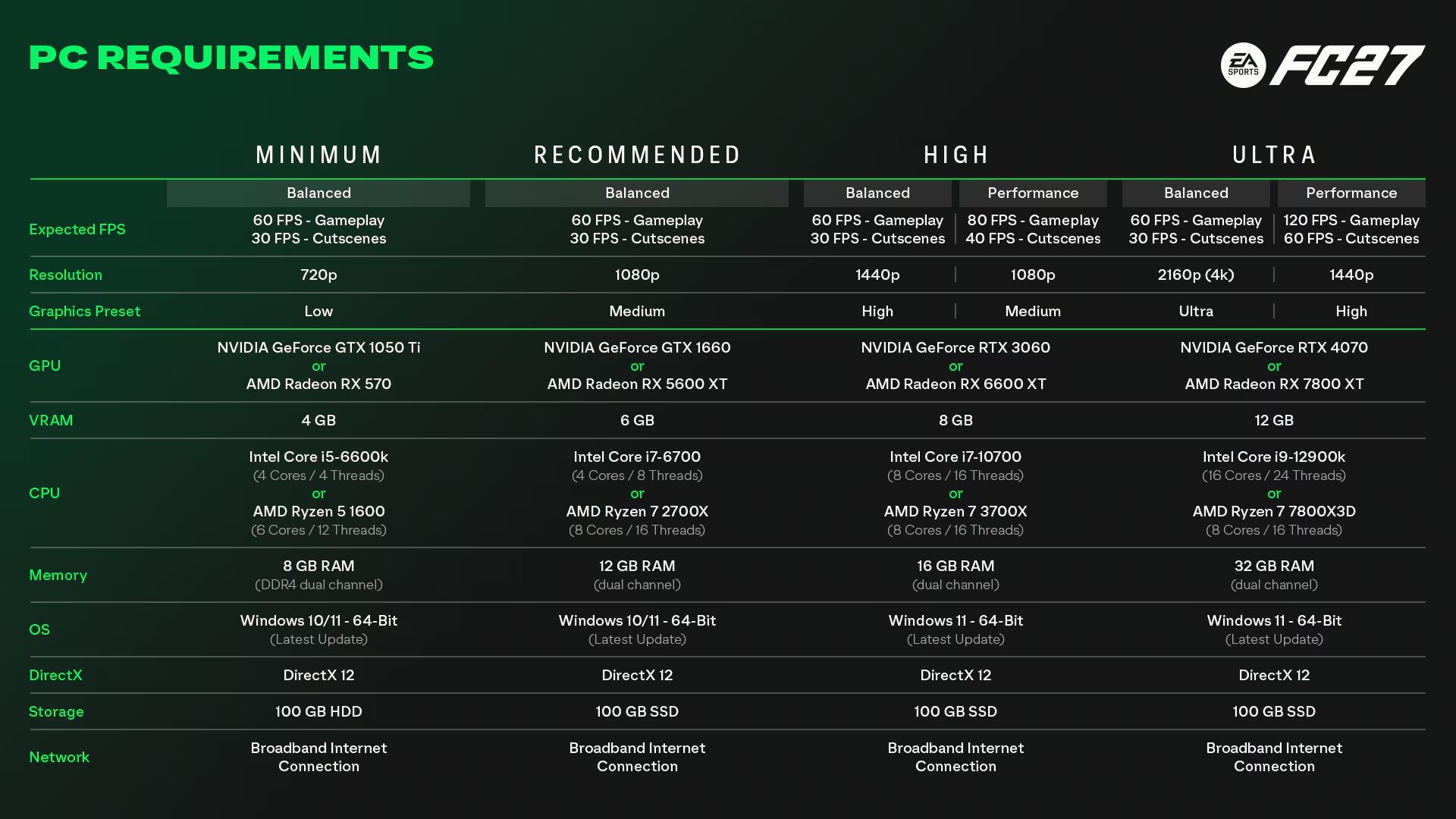
- Check the system requirements. EA's minimum is a GTX 1050 Ti / RX 570, i5-6600K / Ryzen 5 1600, 8 GB of dual-channel DDR4, DirectX 12, 64-bit Windows 10/11 and 100 GB of storage. Recommended is a GTX 1660 / RX 5600 XT, i7-6700 / Ryzen 7 2700X and 12 GB of RAM.
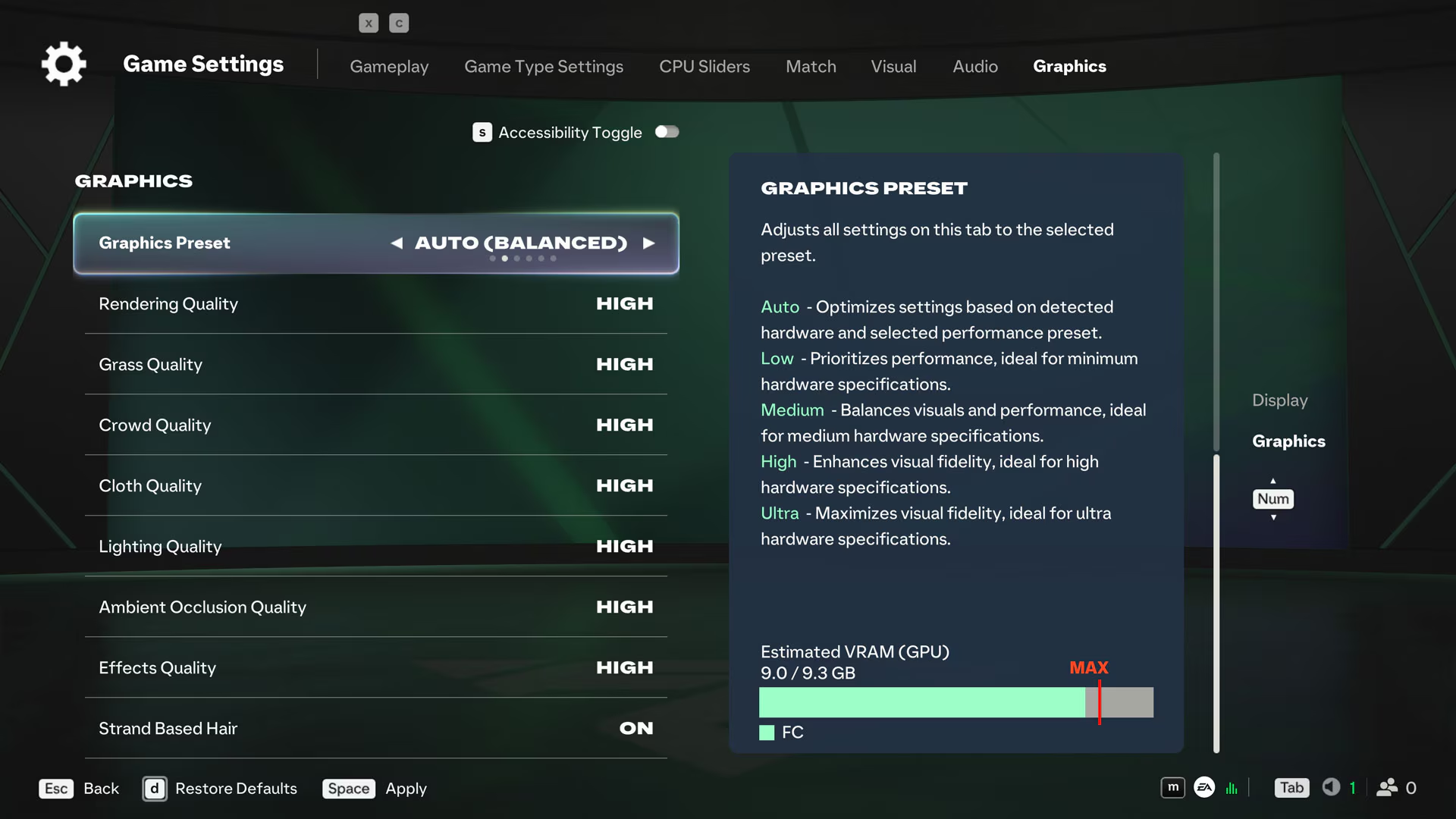
- Close background apps. This is EA's first suggestion. Browsers, recording tools, launchers and overlays can conflict with the game, and EA notes the in-game overlay setting can sometimes cause crashes.
- Update your GPU driver. EA's FC 27 PC performance article recommends it directly. On Intel Arc, keep an eye on the forum threads, as some players link the issue to specific driver versions.
- Repair the game files. In the EA app, go to Library, find the game, select the Manage icon and choose Repair. On Steam, use the verify files option in the game's Properties.
- Cap your frame rate or enable V-Sync. EA suggests limiting the frame rate or turning on V-Sync to match your display's refresh rate.
- Do a clean boot. EA recommends starting Windows with a clean boot to disable background tasks that might interfere.
- Fix EA Javelin anticheat conflicts. FC 27 uses EA Javelin anticheat. EA says its errors usually come from corrupted files or conflicting software. EA's denylist includes RGB, monitoring and audio tools such as ASUS Aura Sync, MSI Command Center, Razer Synapse, HWiNFO, CPU-Z, Process Explorer and Voicemod. Updating them is usually enough; otherwise close them. To reinstall the anticheat, run EAAntiCheat.Installer.exe from C:\Program Files\EA\AC. EA Javelin requires Windows 10 20H1 (10.0.19041) or newer.
- Make sure your RAM runs in dual-channel. EA's FC 27 article says single-channel memory can cause unstable performance. Check your PC or motherboard manual for the right slots.
- Reinstall the game and the EA app. If nothing else works, EA's last suggestion is a clean reinstall.
If FC 27 crashes on PlayStation or Xbox
EA Help's console advice:
- Check for updates: make sure both the system software and the game are up to date.
- Unplug USB devices and restart the console. If needed, power it down fully, unplug it and wait before turning it back on.
- Reinstall the game. If you use an external drive, try installing to internal storage.
- On PlayStation, restore licences from the account management section in Settings.
- On Xbox, clear the alternate MAC address: Settings > All Settings > Network > Network Settings > Advanced Settings > Alternate MAC address > Clear, then restart. EA also suggests deleting local saved data; without cloud saves, you could lose progress.
If you're being kicked from online matches
If the game doesn't crash but your connection drops, the problem is your network. EA's connection article recommends a wired connection, turning your router off and unplugging it for about a minute, and checking the server status page on EA Help. For DNS issues, you can try alternatives such as Google DNS or OpenDNS. For older advice, see our FIFA 23 disconnect issue guide.
Sources: EA Help - crashing and freezing, EA Help - EA Javelin anticheat, EA Help - FC 27 system requirements.
Frequently Asked Questions
Why does FC 27 crash to desktop?
The most common causes are background software, outdated graphics drivers and corrupted game files. EA's forums also have reports of DXGI crashes on Intel Arc cards, which have no official fix yet.
How do I repair FC 27 game files?
In the EA app, find the game in your Library, select the Manage icon and choose Repair. On Steam, verify the game files from the game's Properties.
How do I fix FC 27 anticheat errors?
Restart the game first. Update or close RGB and hardware monitoring tools on EA's denylist. If it continues, reinstall the anticheat with the installer in C:\Program Files\EA\AC.
What are the minimum PC requirements for FC 27?
EA lists a GTX 1050 Ti or RX 570, an i5-6600K or Ryzen 5 1600, 8 GB of dual-channel RAM, DirectX 12 and 100 GB of free space.
Frequently asked questions
Questions answered in this article
Sources
External links cited in this article
Newsletter
The week's biggest gaming news, every Friday morning
One email every Friday: the week's most-read stories and what's new. No spam, unsubscribe anytime.
LoL, TFT ve VALORANT sever bir oyun sever ve oyuncu. Mobil platformlarda ise tam bir Clash of clans hastası.