

Xbox Cloud Gaming phone controller preview live
Xbox Cloud Gaming phone controller preview lets Android and iOS drive Smart TV sessions. US players can also try Nano cloud connect over Wi‑Fi.

5 min read
In brief
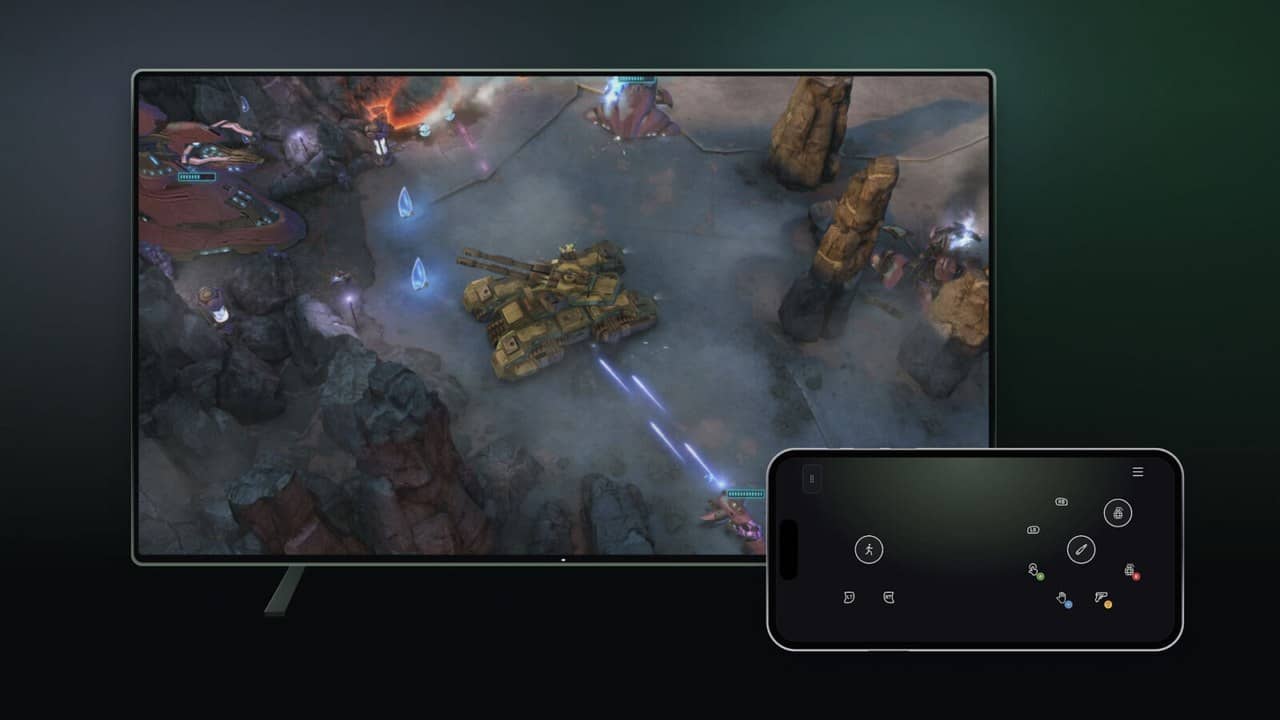
AI summaryXbox Cloud Gaming is previewing phone controllers on supported Smart TVs, letting Android and iOS users scan a QR code and play through a phone browser without a gamepad.
In the United States, Xbox is also testing Wi‑Fi cloud connect for the Xbox Nano Controller to potentially reduce input latency.
Both features have limited device, game, and regional support and remain subject to change based on player feedback.
Contents9 sections
Xbox Cloud Gaming phone controller preview is live. On supported Smart TVs you can use an Android or iOS phone as a controller when no gamepad is nearby. In the United States, Xbox is also previewing cloud connect for the Xbox Nano Controller over Wi‑Fi.
According to Xbox Wire on November 4, 2026, both experiences remain in preview. Device, game, and regional support may be limited while Microsoft learns from feedback.
How does the Xbox Cloud Gaming phone controller work?
If you want to start a cloud game on the TV without a physical controller, the preview lets a supported phone drive the session. Controls open in the phone browser, so no separate controller app is required. Some games also receive layouts tailored to how they play.
| Feature | Detail |
|---|---|
| Phone controller | Android / iOS on supported Smart TVs |
| Setup | Settings > Account > Preview Features |
| Connection | TV QR code + phone browser |
| Nano cloud connect | US preview; Smart TV and web |
| Nano setup | Xbox beta app (Android) or Accessories app on PC |
| Status | Preview — limited device/game support |
Enable Preview Features on the supported Smart TV experience, then launch a game without a physical controller attached. When the phone option appears, scan the QR code. Feedback can be sent from the Xbox icon on the phone after pairing, or through Give Feedback on the TV Guide.
What does Xbox Nano cloud connect change?
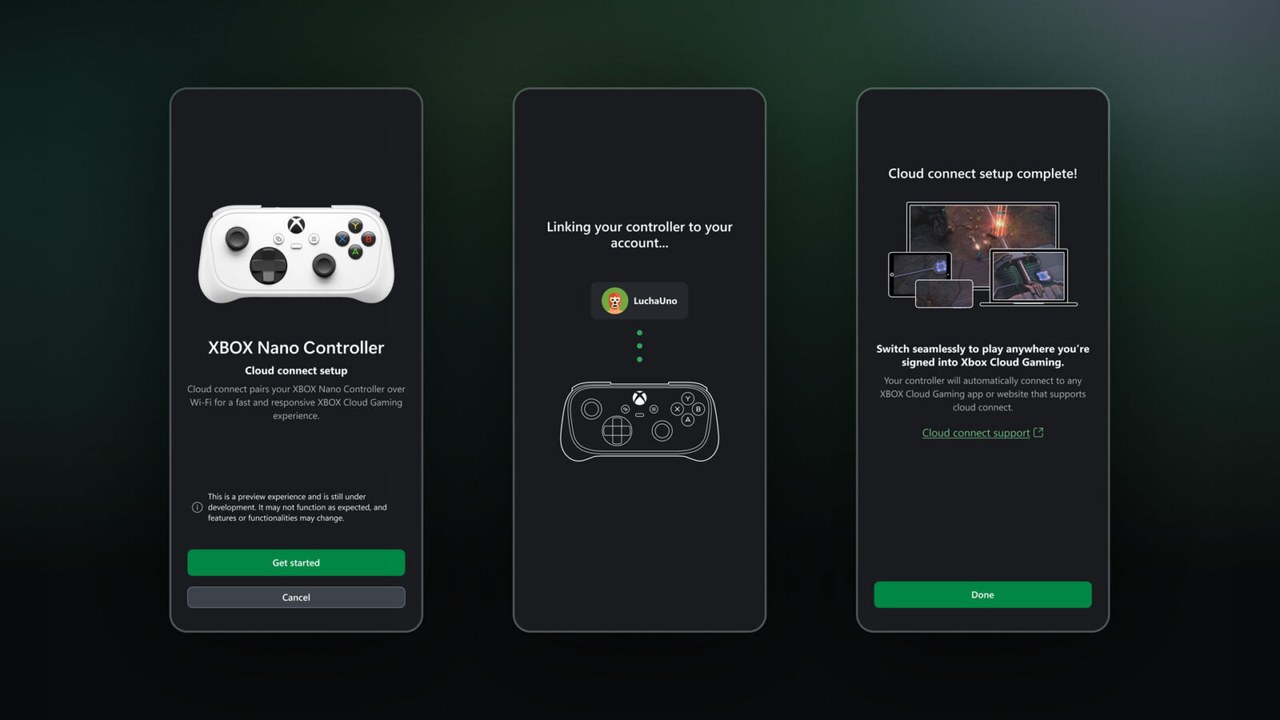
US players can preview cloud connect with the Xbox Nano Controller. Instead of Bluetooth to the TV, the pad uses Wi‑Fi to talk directly to the cloud server running the game. Xbox says that path can reduce input latency and make play feel more responsive.
Set it up with the Xbox beta app on Android or the Xbox Accessories app on PC; the PC route needs Xbox Insider enrollment. Sign into a supported Cloud Gaming experience with the same account used during setup. Xbox publishes a full support guide for the steps.
Cloud connect does not cover every cloud gaming experience yet. Xbox Wire stresses both features are still being tested and may change based on player reports.
Why does this matter for cloud players?
- Couch play is possible even when the pad is missing
- Per-game phone layouts can improve touch sessions
- Nano owners in the US can test the lower-latency claim in real matches
- The features matter most where Game Pass Ultimate / Cloud Gaming is available
The update shows Xbox expanding cloud inputs, not only the game catalog. For November additions see Xbox Game Pass November 2026 wave 1. Related platform timing is covered in Warzone last-gen shutdown and console market context in Switch 2 sales.
Who should care about Xbox Cloud Gaming inputs?
The Xbox Cloud Gaming preview helps most when the pad is missing. Your phone is already in your pocket; scan the QR code and keep the session alive. Touch layouts will not match a full controller in competitive play, but they are fine for menus and many single-player tempos.
Game Pass Ultimate members already have Cloud Gaming access. New input paths make the TV app more useful for guests and travel days. Because this is a preview, not every Smart TV model or every title will work. Check Xbox support for the device list before you plan a session around it.
For Nano owners in the US, Wi‑Fi cloud connect aims to cut the extra hop of Bluetooth through the TV. That may matter in twitchy cloud tests. Outside the US, the phone controller is the path available today. Feedback links are open, and Xbox Wire says lessons will shape later updates.
In short, Xbox Cloud Gaming is trying to solve both the missing-controller problem and Nano latency complaints. If the previews mature, cloud play on the living-room TV gets more realistic. For now, treat them as tests with clear limits.
Frequently asked questions
How do you enable the phone controller on Xbox Cloud Gaming?
On a supported Smart TV experience, turn on Preview Features under Settings > Account. Launch a game without a physical controller and choose the phone option; controls open in the phone browser after you scan the QR code.
Where is Xbox Nano cloud connect available?
The preview is live in the United States on supported Smart TVs and the web. It uses Wi‑Fi to reach the cloud session instead of Bluetooth to the TV.
Are these features fully released?
No. Both are previews with limited device, game, and experience support while Xbox gathers feedback.
Sources
Frequently asked questions
Questions answered in this article
- How does the Xbox Cloud Gaming phone controller work?
- What does Xbox Nano cloud connect change?
- Why does this matter for cloud players?
- Who should care about Xbox Cloud Gaming inputs?
- How do you enable the phone controller on Xbox Cloud Gaming?
- Where is Xbox Nano cloud connect available?
- Are these features fully released?
Sources
External links cited in this article
Newsletter
The week's biggest gaming news, every Friday morning
One email every Friday: the week's most-read stories and what's new. No spam, unsubscribe anytime.
LoL, TFT ve VALORANT sever bir oyun sever ve oyuncu. Mobil platformlarda ise tam bir Clash of clans hastası.


