FC 27 Best Graphics Settings for More FPS on PC
Which FC 27 graphics settings should you lower for more FPS? Official PC system requirements, the new presets, the VRAM indicator and EA's stutter fixes.

7 min read

In brief
AI summaryFor more FPS in FC 27, start with the Performance preset, cap gameplay at 60 FPS, keep Render Scale at 100, and disable Strand-Based Hair and Motion Blur.
Lower grass, crowd, lighting, ambient occlusion, terrain, and shadow-related settings to Low while using Dynamic Resolution Scaling with a 60 FPS target.
FC 27 adds Performance and Balanced modes, a VRAM usage indicator, Enhanced Ultra Visuals for high-end PCs, faster launches, and CPU-load improvements.
Contents12 sections
The FC 27 best graphics settings for more FPS: start from the Performance preset, cap the frame rate at 60 FPS, drop grass, crowd and lighting quality to Low, and switch off Strand-Based Hair and Motion Blur. Keep Render Scale at 100.
EA reworked the PC version for FC 27, adding new Performance and Balanced graphics modes, a VRAM indicator and an optional Enhanced Ultra Visuals tier for high-end rigs. Below you will find the official system requirements, setting-by-setting recommendations and EA's own fixes for low FPS and stutter.
FC 27 PC system requirements
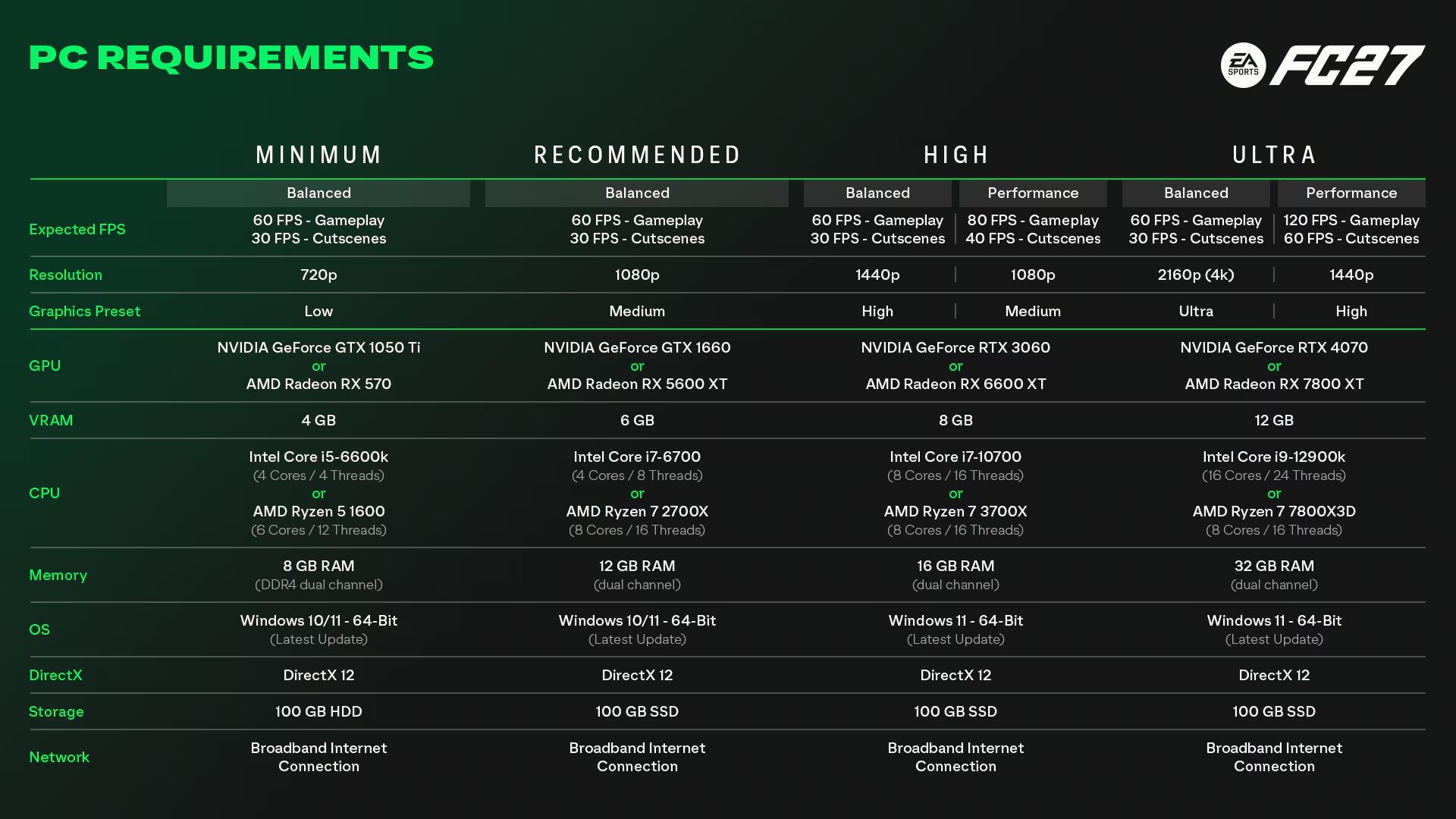
The minimum and recommended specs on EA Help match the Steam store page exactly. For FC 27, EA specifically lists dual-channel RAM in the requirements.
| Component | Minimum (Low, 720p, 60 FPS) | Recommended (Medium, 1080p, 60 FPS) |
|---|---|---|
| OS | Windows 10/11 64-bit | Windows 10/11 64-bit |
| CPU | Intel Core i5-6600K / AMD Ryzen 5 1600 | Intel Core i7-6700 / AMD Ryzen 7 2700X |
| Memory | 8 GB DDR4, dual channel | 12 GB, dual channel |
| GPU | GeForce GTX 1050 Ti / Radeon RX 570 | GeForce GTX 1660 / Radeon RX 5600 XT |
| VRAM | 4 GB | 6 GB |
| DirectX | DirectX 12 | DirectX 12 |
| Storage | 100 GB HDD (SSD recommended) | 100 GB SSD |
EA also published four higher-end targets. In every preset, cutscenes run at half the gameplay frame rate.
| Preset | Resolution and FPS target | GPU | CPU | RAM / VRAM |
|---|---|---|---|---|
| High – Balanced | 1440p, 60 FPS | RTX 3060 / RX 6600 XT | Core i7-10700 / Ryzen 7 3700X | 16 GB / 8 GB |
| High – Performance | 1080p, 80 FPS | RTX 3060 / RX 6600 XT | Core i7-10700 / Ryzen 7 3700X | 16 GB / 8 GB |
| Ultra – Balanced | 2160p (4K), 60 FPS | RTX 4070 / RX 7800 XT | Core i9-12900K / Ryzen 7 7800X3D | 32 GB / 12 GB |
| Ultra – Performance | 1440p, 120 FPS | RTX 4070 / RX 7800 XT | Core i9-12900K / Ryzen 7 7800X3D | 32 GB / 12 GB |
The High and Ultra tiers call for Windows 11, dual-channel memory and an SSD.
What is new for FC 27 on PC?

According to EA's FC 27 PC Deep Dive, published on September 2, 2026, the headline changes are:
- New graphics modes: Performance and Balanced modes, plus new High and Ultra presets targeting at least 80 and 120 FPS respectively. Individual settings can still be customised.
- VRAM indicator: The graphics menu now estimates your maximum in-game video memory usage as you change settings.
- Enhanced Ultra Visuals: Extra options that go beyond the Ultra preset. Disabled by default.
- Faster launch: A streamlined startup flow on Steam, with EA reporting launch time improvements of around 50% in some configurations.
- CPU load fixes: Work aimed at cases where high CPU load hurt responsiveness.
FC 27 best graphics settings for more FPS
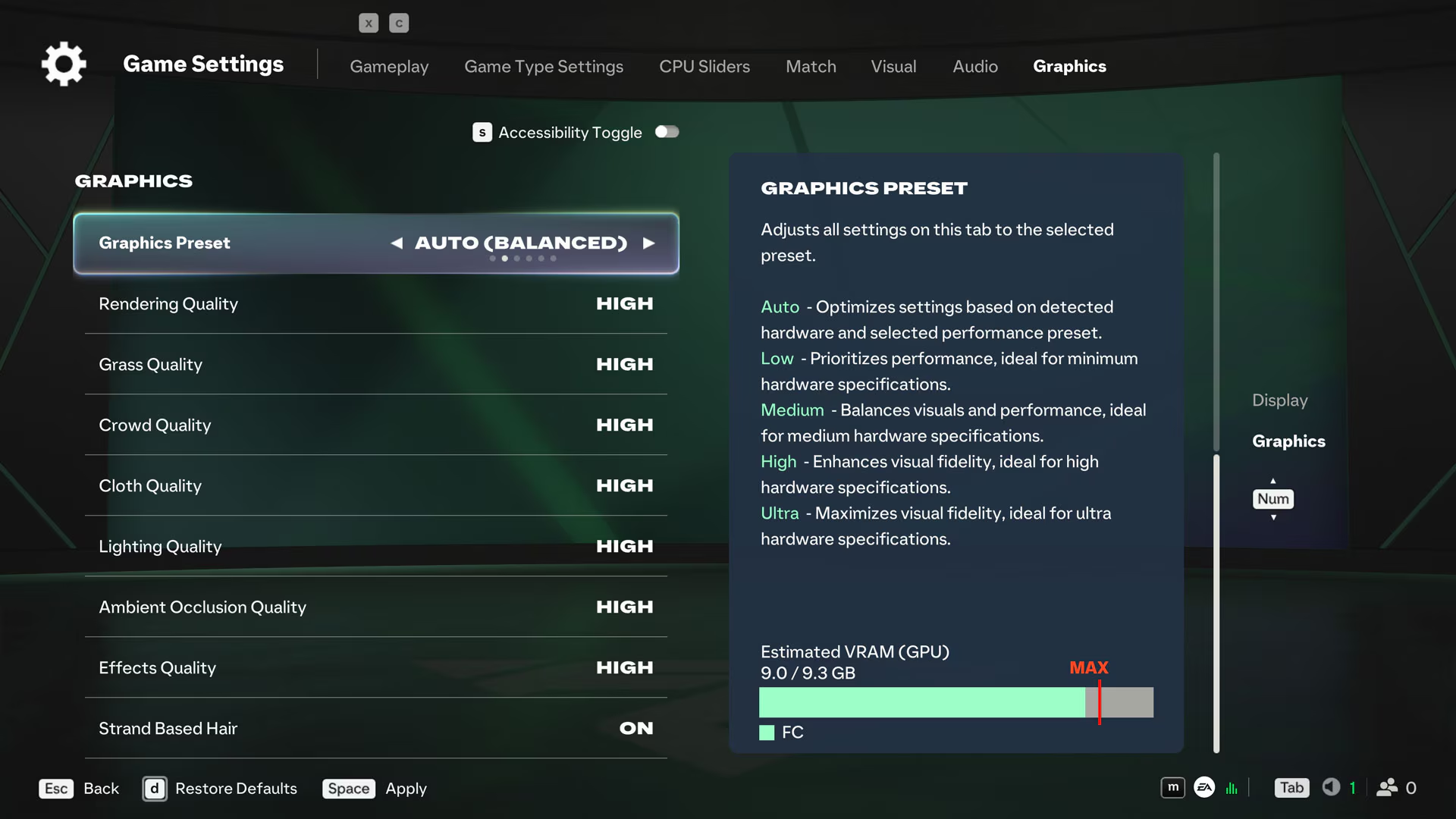
Use the table below as a starting point for smooth gameplay on mid-range and entry-level PCs. The setting names are the menu labels used in Destructoid's and Hone.gg's FC 27 guides. Set both Performance Preset and Graphics Preset to Custom first, then adjust each option.
| Setting | FPS-focused value | Why |
|---|---|---|
| Display Mode | Borderless or Fullscreen | Fullscreen on a single monitor; Borderless if you alt-tab a lot |
| Frame Rate Limit | 60 FPS (120 if your PC holds it) | A locked frame rate feels smoother than a fluctuating high one |
| VSync | Off | Lower input lag; turn it on only if tearing bothers you |
| Render Scale | 100 | Lowering it makes the image noticeably softer |
| Dynamic Resolution Scaling | On, 60 FPS target | Drops resolution in busy moments to protect the target |
| Rendering Quality | Medium | A balance of image and performance |
| Grass Quality | Low | On screen the whole match; a big saving |
| Crowd Quality | Low | Crowds also load the CPU |
| Cloth Quality | Medium | Kits still look good |
| Lighting Quality | Low | One of the heavier options |
| Ambient Occlusion Quality | Low | Shadow detail with little gameplay impact |
| Effects Quality | Medium | The first thing to lower if stutter continues |
| Strand-Based Hair | Off | Cuts the load in close-ups and celebrations |
| Terrain / Terrain Decoration Quality | Low | Pitchside detail |
| Motion Blur | Off | Clearer motion, less load |
| 3D Goal Nets | On | Cheap and looks better |
| Enhanced Ultra Visuals | Off | For high-end hardware only |
| Cutscene Performance | Personal preference | Does not affect in-match FPS |
Keep an eye on the new VRAM indicator while you tune. If the estimate goes beyond your card's memory, scale back the visual-detail settings first.
What about high-end PCs?
If your hardware matches EA's High or Ultra rows, simply pick that preset instead of tuning by hand. Go for the Performance variant if you want maximum FPS in competitive matches, or Balanced if image quality comes first. Only switch on Enhanced Ultra Visuals if you comfortably hold your Ultra target and the VRAM indicator has room to spare.
EA's official fixes for low FPS and stutter
EA Help's FC 27 PC performance article covers delayed inputs, stuttering and slow-motion gameplay that happen even when your connection is stable. EA recommends trying these steps in order and checking gameplay after each one:
- Lower your target frame rate (for example, from 60 FPS to 30 FPS).
- Reduce demanding settings such as graphics quality and resolution.
- Close background apps that use your CPU, GPU or memory, including browsers, overlays, recording tools and launchers.
- Check that your RAM is running in dual-channel mode.
- Update your GPU drivers.
- Review Windows power mode, laptop performance mode and your GPU control panel settings.
Running a single stick of RAM?
EA puts real emphasis on dual-channel memory. With one stick, or with sticks in the wrong slots, memory runs in single-channel mode and stutter can get worse. EA gives 2x4 GB for Minimum and 2x16 GB for Ultra as examples. Check your motherboard manual for the right slots; BIOS/UEFI or a hardware info tool will show the current mode.
If the stutter comes with ping icons during matches, your connection is the more likely culprit, so check EA's Connection Quality tools instead. For comparison with last generation's advice, see our FC 24 graphics settings guide.
Frequently Asked Questions
How much storage does FC 27 need?
EA and Steam both list 100 GB of free space. An HDD is supported at minimum spec, but EA strongly recommends an SSD, and one is required from the recommended tier upwards.
Can a GTX 1050 Ti run FC 27?
Yes. The GTX 1050 Ti and RX 570 are the minimum-spec cards, with EA targeting 720p at 60 FPS on the Low preset.
Does Enhanced Ultra Visuals lower FPS?
EA describes these options as pushing visual quality beyond Ultra for high-end hardware. They are off by default; leave them off if performance is your priority.
Does FC 27 support DLSS or FSR?
Neither EA's FC 27 PC Deep Dive nor the official system requirements page mentions DLSS, FSR or frame generation. Some third-party guides refer to upscaling options, but this is not confirmed by an official source.
Why does FC 27 stutter when my FPS looks fine?
EA notes that frametime spikes, single-channel RAM, background apps or power settings can cause stutter even with a normal average FPS. Lowering your target frame rate and checking for dual-channel memory are the first steps.
Frequently asked questions
Questions answered in this article
Sources
External links cited in this article
Newsletter
The week's biggest gaming news, every Friday morning
One email every Friday: the week's most-read stories and what's new. No spam, unsubscribe anytime.
LoL, TFT ve VALORANT sever bir oyun sever ve oyuncu. Mobil platformlarda ise tam bir Clash of clans hastası.